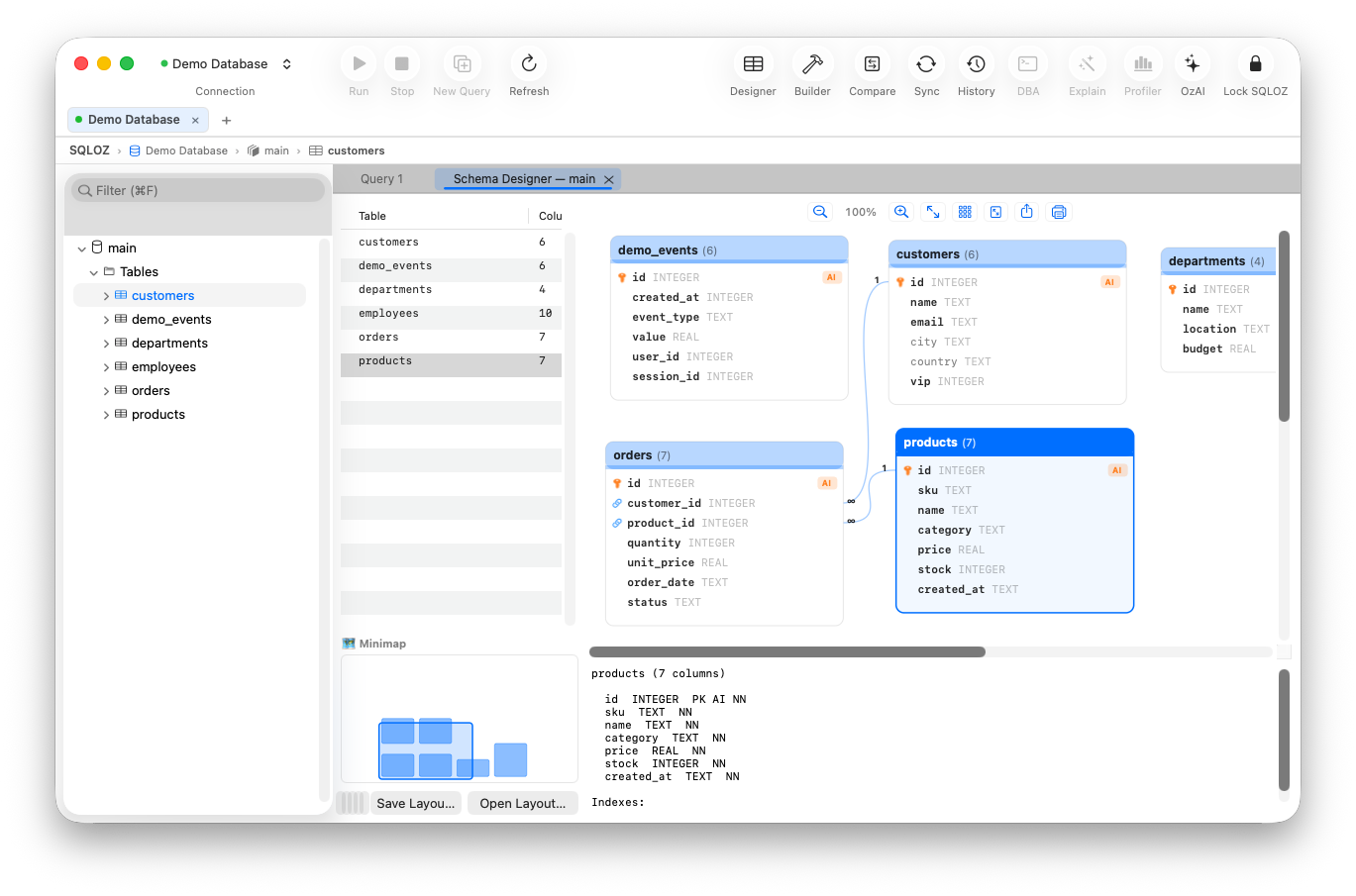
Chapter 5: Visual Schema Designer
Info: This chapter explains visualizing table schemas (reverse engineering), designing tables and foreign-key relations with drag-and-drop, and exporting the canvas as a visual output. The relationship canvas is table-focused; it is not a general view/routine dependency analyzer.
In this chapter:
- 5.1 Visualizing a Schema with Reverse Engineering
- 5.2 Designing Tables & Relations with Drag-and-Drop
- 5.3 Canvas Navigation & Visual Output
- Related Topics
5.1 Visualizing a Schema with Reverse Engineering
Reading the relations between tables in a large database from DDL code is tedious. SQLOZ collects supported table metadata and converts it to a visual canvas.
- Right-click the database name in the left sidebar.
- Select Design Schema….
- SQLOZ reads all tables, column types and Primary/Foreign Key relations and arranges them as colored cards.
Each column type on a card is shown with a badge.
| Badge | Meaning |
|---|---|
| PK (gold) | Primary Key |
| FK (blue) | Foreign Key |
| UQ (emerald) | Unique Index |
| AI (orange) | Auto-Increment |
Tip: Hovering over an FK badge highlights the related table in color, so the relations can be followed visually.
5.2 Designing Tables & Relations with Drag-and-Drop
To create a table or relation from scratch, follow these steps.
- Right-click an empty area of the canvas and choose Add Table….
- Add the table name, engine (e.g.
InnoDB) and columns visually. - To create a foreign key: Drag the
user_idcolumn of thepaymentscard onto theidcolumn of theuserscard. - SQLOZ draws the relation line between the two tables and prepares the
FOREIGN KEY (user_id) REFERENCES users(id)constraint in the background. - Apply the generated SQL to the database with Save Changes.
5.3 Canvas Navigation & Visual Output
- Zoom to fit (
Cmd + 0): Fits all tables on one screen. - Find table (
Cmd + F): Searches for a table name on the canvas and focuses on the relevant card. - Export (Diagram): Use the Export Diagram icon on the toolbar to save the table diagram as high-resolution PNG or vector PDF for management presentations and architectural documentation.