Chapter 7: Data Compare & Synchronization
Info: This chapter explains row-by-row comparison of data in two databases, impact analysis reports, throttle delay, attended decisions, and the configured backup/rollback posture.
In this chapter:
- 7.1 Row-by-Row Data Comparison
- 7.2 Pre-Flight Impact Analysis Report
- 7.3 Throttle Delay
- 7.4 Automatic Data Backup & Rollback
- Related Topics
7.1 Row-by-Row Data Comparison
Synchronizing data between two databases requires a decision for every row beforehand. Blind copying can corrupt the data in the target.
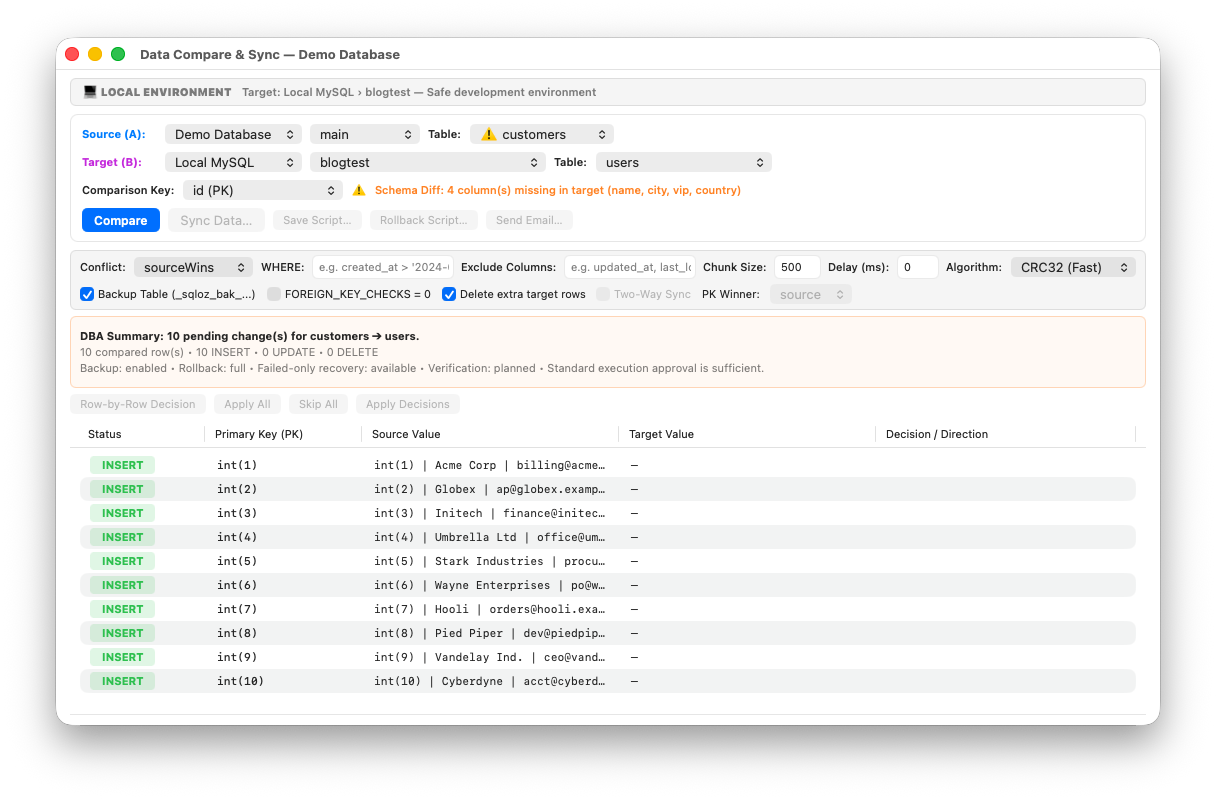
- Open Tools → Compare Data… from the menu.
- Map the source and target tables (e.g.
users → users). - Start the row-by-row comparison with Compare Data. The results are presented in a decision table:
- 🟢 Rows to add (INSERT): Rows that do not exist in the target.
- 🟡 Rows to change (UPDATE): Rows with the same identity but different values.
- 🔴 Extra rows in target (DELETE): Rows deleted in the source but still present in the target.
7.2 Pre-Flight Impact Analysis Report
Before applying the synchronization, SQLOZ shows the computed change summary and safety decision:
Pre-Flight Impact Analysis Report: - Records to add: 1,420 (INSERT)
- Records to update: 85 (UPDATE)
- Records to delete: 0 (DELETE)
- Total changes: 1,505
- Estimated runtime: 0.75 s
Are you sure you want to apply these changes to the target database? [Cancel] [Apply Synchronization]
7.3 Throttle Delay
When synchronizing very large tables, sending consecutive INSERTs to the target can increase load and replica lag.
Enter a millisecond value (e.g. 100 ms) in the Throttle Delay (ms) field in the Data Compare toolbar. SQLOZ waits for this duration after each chunk transfer to reduce burst load and replica-lag risk.
7.4 Automatic Data Backup & Rollback
When the target and policy support it, data synchronization can use the Backup Table (sqloz_bak…) posture before applying changes. Review the status shown in the window; a recommendation or disabled state is not proof that a backup was created.
- Backup posture: When enabled and successfully completed, the target-table safety backup is recorded before synchronization. The exact backup mechanism and whether the action is available depend on the target vendor and current policy.
- Data recovery (rollback SQL): When a rollback script is available, it contains row-level reverse operations for the planned changes. Depending on the diff, those operations can be
DELETE,UPDATErestoring the prior target values, orINSERTrestoring rows removed from the target. The script is rendered in reverse order for foreign-key integrity; it is not a blanketINSERT ... SELECTtable restore.