
In software engineering communities, few topics spark more passionate debate than visual development tools vs. writing raw code.
Purist developers often argue that true professionals should write every query by hand in a text editor. On the other side, productivity advocates point out that typing repetitive JOIN, WHERE, and GROUP BY boilerplate for the hundredth time is an inefficient use of engineering time.
The reality, as with most engineering trade-offs, is nuanced. The most productive developers in 2026 don’t dogmatically choose one over the other - they know exactly when a visual builder accelerates their workflow, and when hand-crafted SQL is required.
In this technical breakdown, we examine the pros, cons, and speed trade-offs of Visual Query Builders vs. Writing Raw SQL.
1. When Visual Query Builders Win Decisively
A. Exploring Unfamiliar or Legacy Schemas
When onboarding to a new codebase with 80 interconnected tables, typing SELECT * FROM ... requires constantly querying information_schema to discover column names and foreign key references.
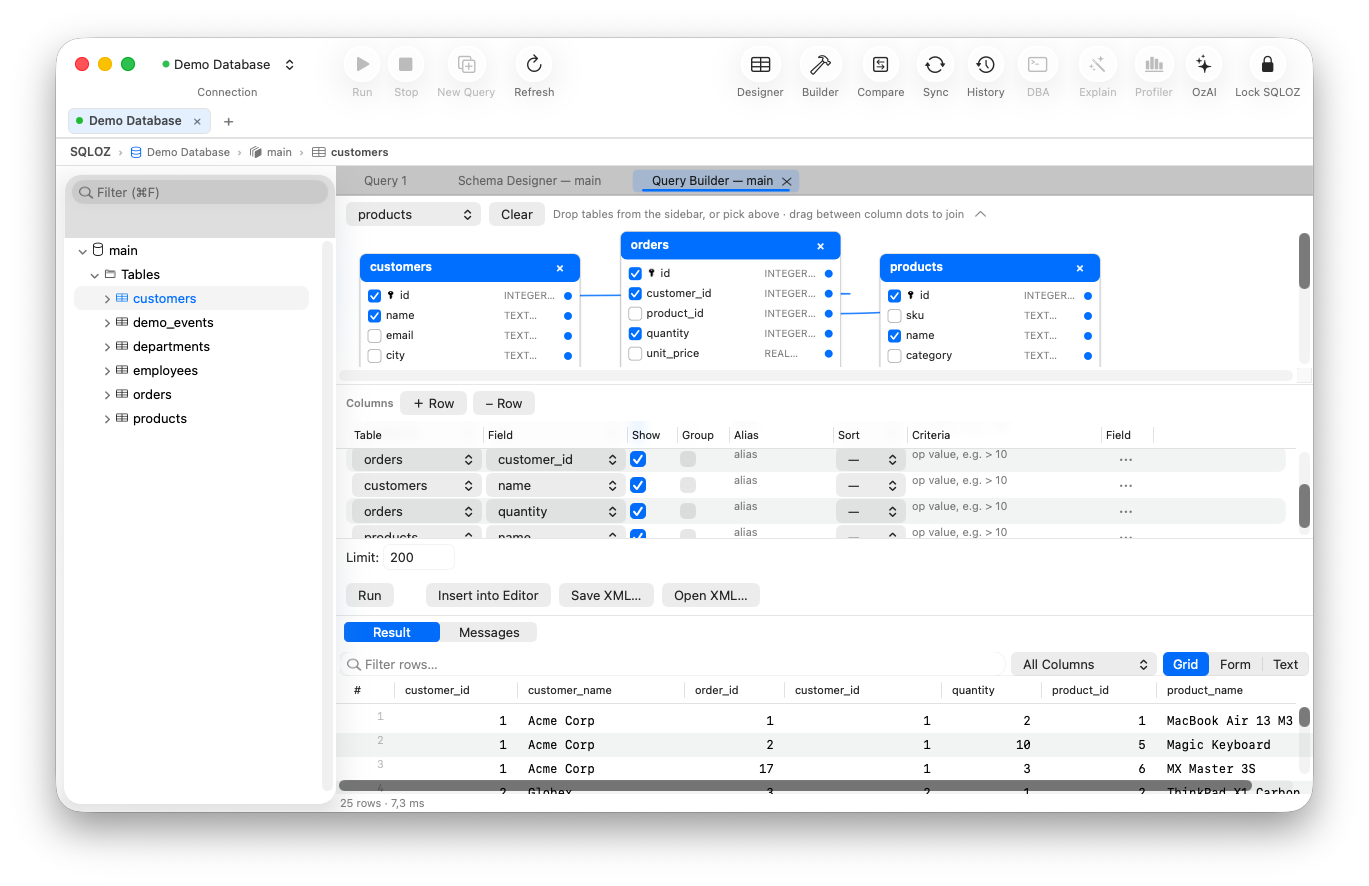
- The Visual Advantage: Dragging 4 tables onto an interactive canvas instantly visualizes all foreign keys and primary keys. Connecting them takes two clicks.
B. Avoiding Accidental Cartesian Products (CROSS JOIN)
When joining 5 or 6 tables by hand, forgetting a single ON a.id = b.a_id join predicate accidentally triggers a full Cartesian multiplication of millions of rows, spiking database CPU to 100%.
- The Visual Advantage: Visual builders require explicit node connections, guaranteeing that every joined table has a valid, SARGable join predicate.
C. Rapid Ad-Hoc Reporting and Cohort Analysis
Building summary aggregations (COUNT DISTINCT, SUM, AVG) with grouped filters for non-technical stakeholders takes seconds on a visual canvas without typing out tedious GROUP BY column lists.
2. When Writing Raw SQL is Essential
A. Recursive Common Table Expressions (CTEs)
When querying hierarchical tree structures (such as organizational charts or nested category taxonomies using WITH RECURSIVE), writing raw SQL gives you full control over the anchor and recursive union members.
B. Dialect-Specific Optimizer Hints
When you need to force a specific index or adjust optimizer costs (such as USE INDEX (idx_status) in MySQL or SET enable_seqscan = OFF in PostgreSQL), raw SQL gives you low-level engine control that visual abstractions typically abstract away.
C. Complex Window Partitions
Complex analytical window queries with custom frame specifications (ROWS BETWEEN 3 PRECEDING AND CURRENT ROW) are often faster to write directly in text for seasoned data engineers.
3. The Modern Hybrid Paradigm in SQLOZ
Why should you have to choose between a visual builder and a raw SQL editor?
In SQLOZ, the visual canvas and the raw SQL editor are not competing interfaces - they are seamlessly synchronized:
- Start Visually: Drag tables onto the canvas, connect foreign keys, and configure filter pills.
- Inspect Real-Time AST SQL: SQLOZ’s live compiler continuously compiles clean, formatted ANSI SQL in the side panel.
- One-Click Edit: Click Open in SQL Editor to transfer the visually generated query into the full-featured code editor for low-level tuning, query plan analysis in OzExplain, or AI optimization.
Direct Workflow Comparison
| Development Task | Visual Query Builder | Raw SQL Text Editor |
|---|---|---|
| Mapping 4-Table JOINs | ~15 seconds (Drag & Drop) | ~2 minutes (Manual typing) |
| Syntax Error Frequency | Zero (Guaranteed valid AST) | Moderate (Typos, misplaced quotes) |
| Explaining to Stakeholders | Crystal clear visual graph | Inaccessible wall of text |
| Recursive Tree Traversals | Limited | Full dialect control |
| Ad-Hoc Data Exploration | Blazing & Intuitive | Slower discovery cycle |
Summary
Visual query builders are not crutches for beginners - when engineered properly, they are productivity multipliers for senior engineers and data architects.
With SQLOZ, Mac developers get the best of both worlds: a fluid, 120 FPS visual canvas combined with a high-performance native SQL editor.
Download SQLOZ for macOS and experience the future of hybrid visual SQL development.