Chapter 8: Visual Query Builder
Info: This chapter explains dragging and joining tables without writing manual SQL, automatic JOIN detection, visual filtering and live SQL output.
In this chapter:
- 8.1 Creating Queries with Drag-and-Drop
- 8.2 Visual Filtering & Live SQL Output
- 8.3 Save, open and run
- Related Topics
8.1 Creating Queries with Drag-and-Drop
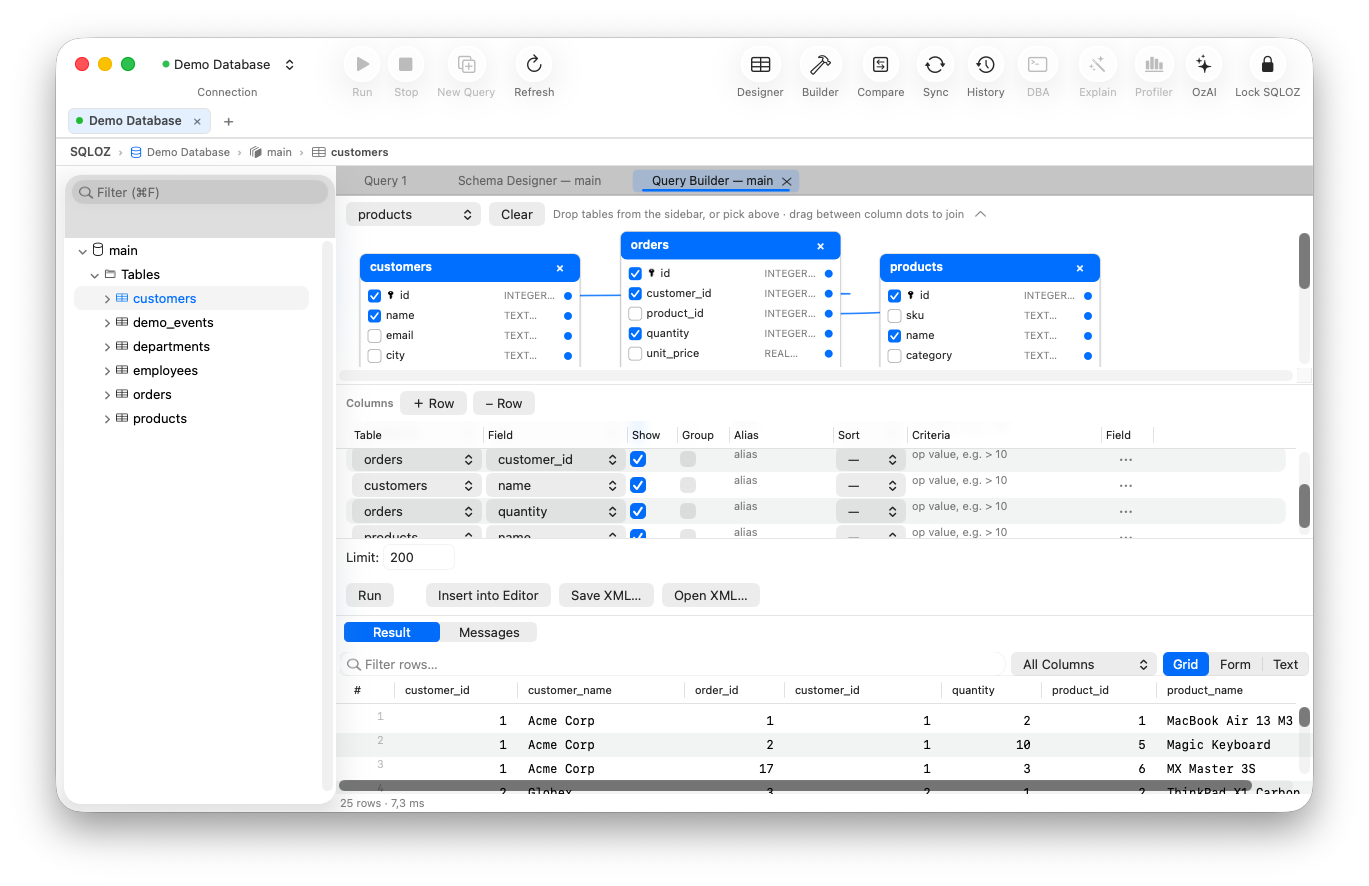
Instead of writing complex report queries that join multiple tables with conditions manually, you can draw them visually.
- Open Tools → Query Builder… from the top menu.
- Drag tables such as
users,ordersandproductsfrom the left list onto the canvas. - Check the column checkboxes on the table cards to select which fields appear in the report.
- Automatic JOIN detection: SQLOZ reads the foreign keys between tables and automatically connects them with a blue relation line.
- Changing the JOIN type: Right-click a line and choose
INNER JOIN,LEFT JOINorRIGHT JOIN.
8.2 Visual Filtering & Live SQL Output
Use the tabs below the canvas to configure the query visually.
- WHERE: Set a column (e.g.
status), an operator (e.g.=) and a value (e.g.'completed'). - GROUP BY: Mark columns for grouping and add aggregate expressions such as
SUM(total_amount)orCOUNT(*). - ORDER BY: Choose a column and ascending or descending order.
- Aliases and visibility: Choose which fields appear and give selected fields a readable alias.
- LIMIT: Set the number of rows to fetch.
Each selection generates live SQL code below that is compatible with your connected database (MySQL backticks or PostgreSQL double quotes). Run the query immediately with Run Query.
8.3 Save, open and run
The builder is split into a canvas, a column grid and a generated-SQL pane. Drag the dividers to give any pane more space. Use Show SQL to reveal or hide the generated statement, Run Query to execute it, and Insert SQL to place the generated text in the editor.
Use Save to store the builder layout as an XML file and Open to restore it later. The builder also has Result and Messages views so you can inspect returned rows and execution errors without leaving the tool.