Chapter 14: OzAI - Natural Language SQL Assistant
Info: This chapter explains generating SQL from natural language with OzAI, improving slow queries, setting up a local AI provider and data-privacy principles.
In this chapter:
- 14.1 Overview
- 14.2 Generating SQL from Natural Language
- 14.3 Slow-Query Improvement & Index Suggestions
- 14.4 Local AI Provider Setup
- 14.5 Security, Privacy & Data Protection
- Related Topics
14.1 Overview
OzAI targets three common problems in database administration:
- The burden of writing complex SQL: In large table and relation networks, writing
JOIN,GROUP BYand date functions correctly by hand takes time. - Slow-query optimization difficulty: Manually analyzing missing indexes, Full Table Scan steps and inefficient subqueries in long-running queries is tedious.
- Enterprise data privacy: When external AI tools are used, there is a risk that database passwords and confidential customer data leak to external servers.
OzAI addresses these problems with a local-first provider model, credential redaction, and explicit endpoint validation.
14.2 Generating SQL from Natural Language
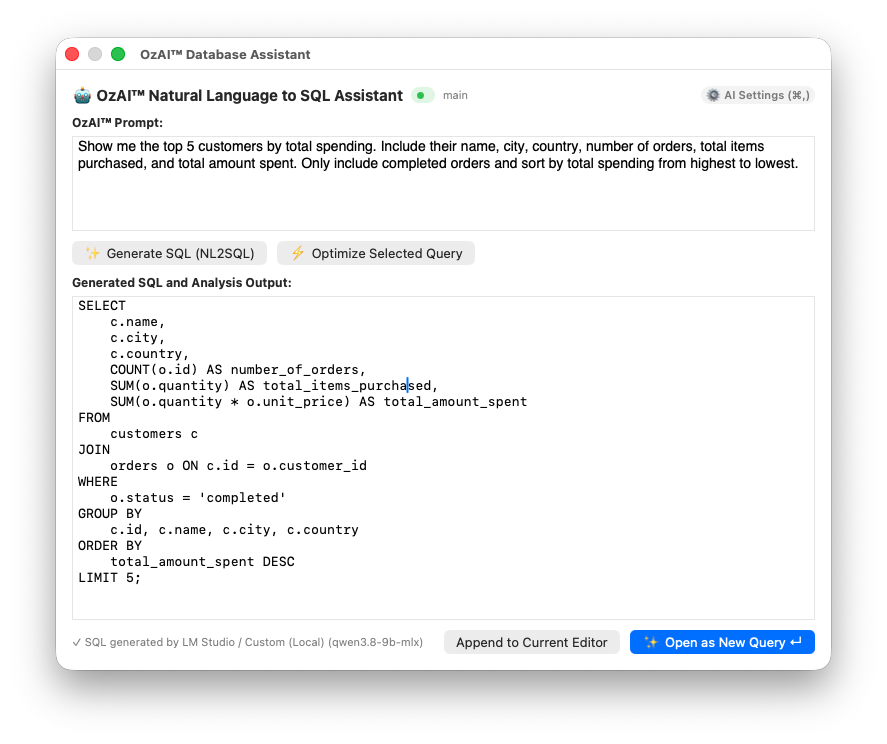
Follow these steps to generate complex queries without writing code.
- Press
Cmd + Kin the SQL editor, or click the OzAI icon on the editor toolbar. - The OzAI Query Bar opens at the top of the editor.
- Type your request in natural language, for example:
“Get the names, emails and total spend of customers who registered in the last 30 days and have at least 3 orders.”
- Press Enter or click Generate Query.
What happens in the background:
- Schema sensing: OzAI collects schema context from the active database before generating SQL. The current window bounds this context to the first 25 tables; verify the generated statement against the full schema before running it.
- Your request is passed to the AI model together with the schema as context.
- The result is valid SQL that joins real tables such as
users,ordersandpaymentswith correct column names. - Use Open in New Query to place the generated SQL in a query tab, then review it before running it.
14.3 Slow-Query Improvement & Index Suggestions
- Select or otherwise make the query active in the SQL editor.
- Open the OzAI window and press Optimize. The button is enabled when an active SQL statement is available.
- OzAI analyzes the query and the bounded schema context, then provides an Optimization Report:
- Rewritten SQL: An optimized copy that converts subqueries to
JOINs and selects only the needed columns instead ofSELECT *. - Missing-index script: A ready command that speeds up the query, e.g.
CREATE INDEX idx_orders_user ON orders (user_id, created_at); - Why it is slow: A clear technical explanation of why the query runs slowly.
- Rewritten SQL: An optimized copy that converts subqueries to
14.4 Local AI Provider Setup
OzAI supports fully local AI engines to prevent data from leaving your device.
- Open SQLOZ → Preferences (
Cmd + ,). - Go to the OzAI Settings tab.
- Choose the local engine from the AI Provider menu:
- Ollama (local): E.g. Llama, CodeLlama, DeepSeek-Coder, Mistral (default
http://localhost:11434). - LM Studio (local): E.g. Qwen 2.5, DeepSeek R1 (default
http://localhost:1234/v1).
- Ollama (local): E.g. Llama, CodeLlama, DeepSeek-Coder, Mistral (default
- Fetch the active models installed on your machine with Fetch Live Models.
- Save with Test Connection & Save.
14.5 Security, Privacy & Data Protection
Enterprise security standards are active by default in the OzAI architecture.
- No automatic row scan: OzAI builds prompts from the user request and the active schema context; query result rows are not automatically included.
- Credential redaction: Connection URLs, passwords, tokens, API keys, and bearer values are redacted before the request is sent. Do not place confidential business data in the user prompt.
- Local by default: Ollama and LM Studio/custom local endpoints use loopback HTTP defaults. A non-loopback endpoint must use HTTPS and explicit consent; credentials embedded in an endpoint URL are rejected.
Important: Schema names and the redacted user prompt are still data. Keep the endpoint local when policy requires that metadata to stay on the device. A remote endpoint is accepted only after explicit HTTPS consent.