Chapter 12: Preferences & Advanced Configuration
Info: This chapter explains the tabbed structure of the preferences window, the controls that affect query safety and display, central SMTP email configuration, and the Pro trial.
In this chapter:
- 12.1 Preferences Window
- 12.2 General, display, and safety preferences
- 12.3 Central SMTP Configuration
- 12.4 Pro access, evaluation, and subscriptions
- Related Topics
12.1 Preferences Window
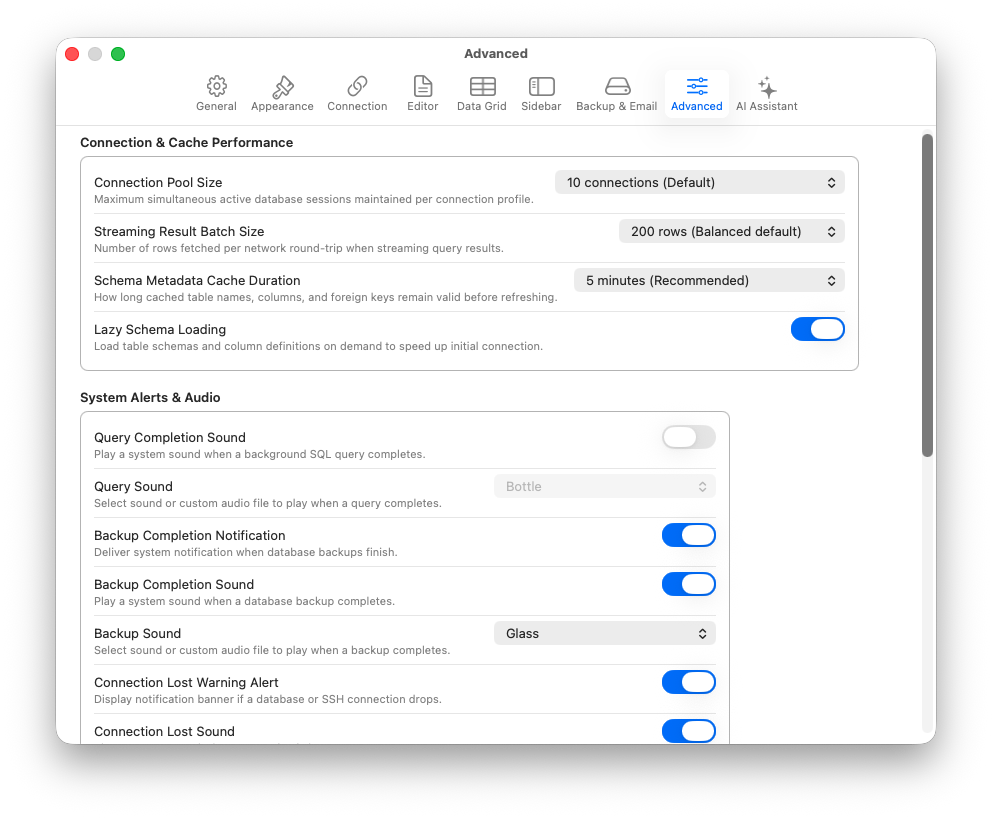
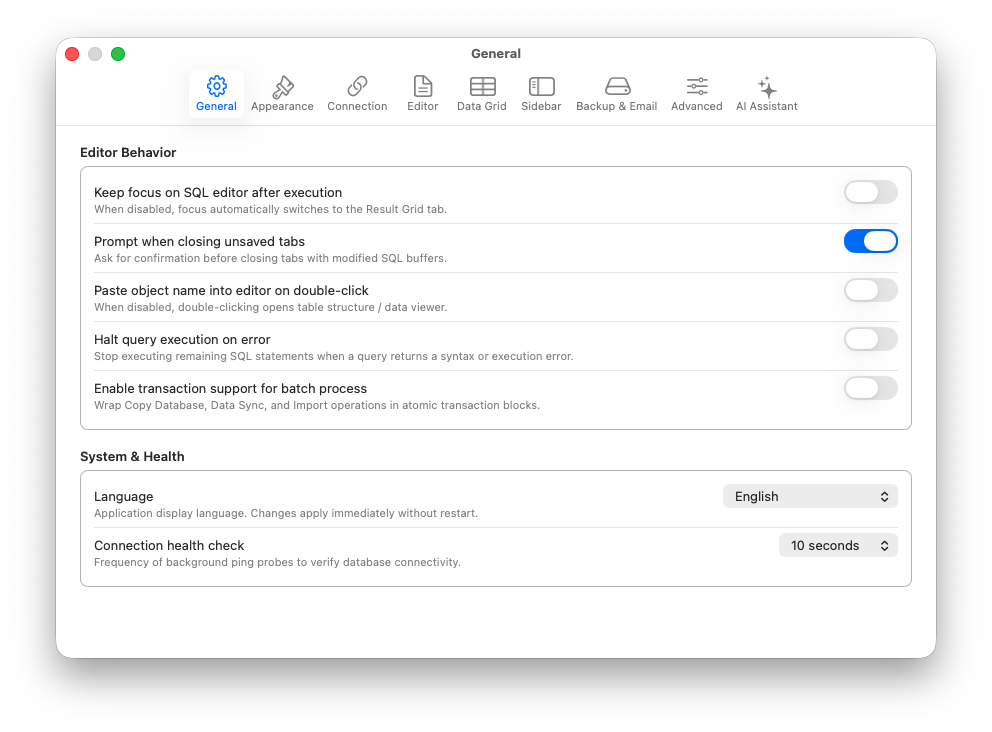
The preferences window (Cmd + ,) is organized into nine panes: General, Appearance, Connection Defaults, Editor, Data Grid, Sidebar, Backup, Advanced, and OzAI Assistant.
| Tab | Content |
|---|---|
| General | Language, editor focus after execution, unsaved-tab prompts, object double-click behavior, halt-on-error, batch transaction wrapping, and connection health-check interval |
| Appearance | System/Light/Dark mode, editor and grid font family/size, accent color, sidebar icon size, and Comfortable/Compact density |
| Connection Defaults | New-profile timeout, SSL policy, charset, vendor/SSH default ports, SSH authentication, sleep disconnect, clipboard clearing, and app-lock triggers |
| Editor | Tab width, line numbers, soft wrap, generated-SQL backticks, query timeout, result row cap, truncation safety cap, and tab auto-save delay |
| Data Grid | Row/date/NULL display, NULL sort order, smart value detection, edit confirmation, copy headers, paging, column sizing, auto-refresh, result-tab position, JSON formatting, default export format, and OzMask rules |
| Sidebar | Object sort/auto-expand and visibility of system tables, views, routines, triggers, and events |
| Backup | Default backup directory, file-conflict policy, and SMTP notification settings |
| Advanced | Connection-pool size, streaming batch size, schema-cache duration, notifications, and developer settings |
| OzAI Assistant | Local provider, model, endpoint, and consent settings |
12.2 General, display, and safety preferences
Open SQLOZ → Settings… (Cmd + ,) and select a pane from the toolbar. The labels describe the behavior directly. Examples of safety-relevant controls are Halt Query Execution on Error, Enable Transaction Support for Batch Process, Query Result Row Cap, Truncate Query Results Without Limit, and Prompt When Closing Unsaved Tabs. The editor timeout accepts a bounded duration; the result cap can be set to a finite limit or Unlimited (Careful).
The Connection Defaults pane applies defaults to newly created profiles. It does not rewrite an existing profile. SSL choices include preferred, required, certificate verification, identity verification, and disabled; choose the policy appropriate to the server before connecting. The Data Grid pane controls presentation and paging, while Default Export Format only preselects an export format and does not bypass result-readability or OzMask safeguards.
The Sidebar pane controls object-browser ordering, automatic schema expansion, and visibility filters. The Backup pane stores the default directory and controls what happens when a dump filename already exists. The Advanced pane controls connection-pool and streaming/cache behavior; higher values can increase concurrent sessions or memory/network use.
12.3 Central SMTP Configuration
SMTP settings are not asked again each time an email is sent from a backup or synchronization script. They are stored in the Backup pane under Email / SMTP Notifications.
- Open Settings… → Backup.
- Enter the SMTP host, port, encryption mode, username, password, sender address, and test recipient.
- Use Send Test Email to validate the configuration.
- In the wizards, the system only asks for the recipient email address (
alici@example.com).
The test button remains unavailable until the required configuration is complete. If the stored password cannot be read, or the selected transport is unavailable, the pane shows the reason. The current controller explicitly reports StartTLS transport as unavailable; use a supported configured mode when testing.
12.4 Pro access, evaluation, and subscriptions
SQLOZ is free to download. Pro entry points use the entitlement gate; when access is unavailable, the gate presents the paywall. A verified active auto-renewable subscription counts as Pro. A bounded verified cache may provide offline grace for up to 24 hours; expired, revoked, unverified, unknown-product, or missing-expiry records do not grant Pro access.
The paid catalog contains these subscription choices when they are available for the current region and platform:
- Monthly: billed monthly and renewed monthly.
- Yearly: billed upfront for a 12-month period and renewed yearly.
- Yearly with monthly billing: billed monthly while a 12-month commitment applies. This is not a cancel-anytime monthly subscription.
Offer availability, displayed names, prices, taxes, and terms are supplied by the Apple App Store. The checkout sheet is authoritative for the offer shown on your device; this guide does not hard-code territory-specific prices.
Apple App Store Connect has a 50% educational institution option for qualifying institutions purchasing 20 or more app licenses through Apple School Manager. This setting concerns the app-license price, not the SQLOZ Pro in-app subscription. SQLOZ is free to download, so the setting does not reduce its download price. SQLOZ does not offer a separate student subscription. No academic pricing is promised here.
Tip: Each installation includes a separate app-managed 7-day Pro evaluation. It is not a StoreKit introductory offer and does not charge you during the evaluation. When it ends, use the in-app purchase or restore controls for subscription access. If you purchase Pro during the evaluation, the remaining evaluation time ends when the paid entitlement becomes active.