
Hetzner is one of the most respected cloud and dedicated server providers in the world, offering incredible performance-to-price ratios for startups, SaaS founders, and indie hackers across Europe and North America.
When you spin up an Ubuntu or Debian dedicated server on Hetzner to host your MySQL database, the default installation restricts MySQL to bind-address = 127.0.0.1. Furthermore, Hetzner’s hardware firewall blocks external port 3306 traffic by default.
To manage your Hetzner database with a native macOS client, the best-practice approach is establishing an encrypted SSH Tunnel.
In this tutorial, we cover the exact configuration steps to connect to your Hetzner server using SQLOZ on Mac.
1. Preparing Your Hetzner Server Credentials
Before configuring your client, verify you have:
- Your Hetzner Server Public IPv4 Address (found in the Hetzner Robot or Cloud Console).
- Your SSH Key: Your private key (typically
~/.ssh/id_ed25519or~/.ssh/id_rsa). - Database Credentials: Your local MySQL username and password (which can be restricted to
localhost).
2. Setting Up the SSH Connection in SQLOZ
SQLOZ provides first-class native support for SSH bastion and dedicated server tunnels on macOS:
Step 1: Configure General Database Settings
- Open SQLOZ and click New Connection ➔ MySQL.
- Host: Enter
127.0.0.1(this refers to the Hetzner server’s internal localhost). - Port:
3306. - User & Password: Your MySQL database credentials.
Step 2: Configure the SSH Tunnel Tab
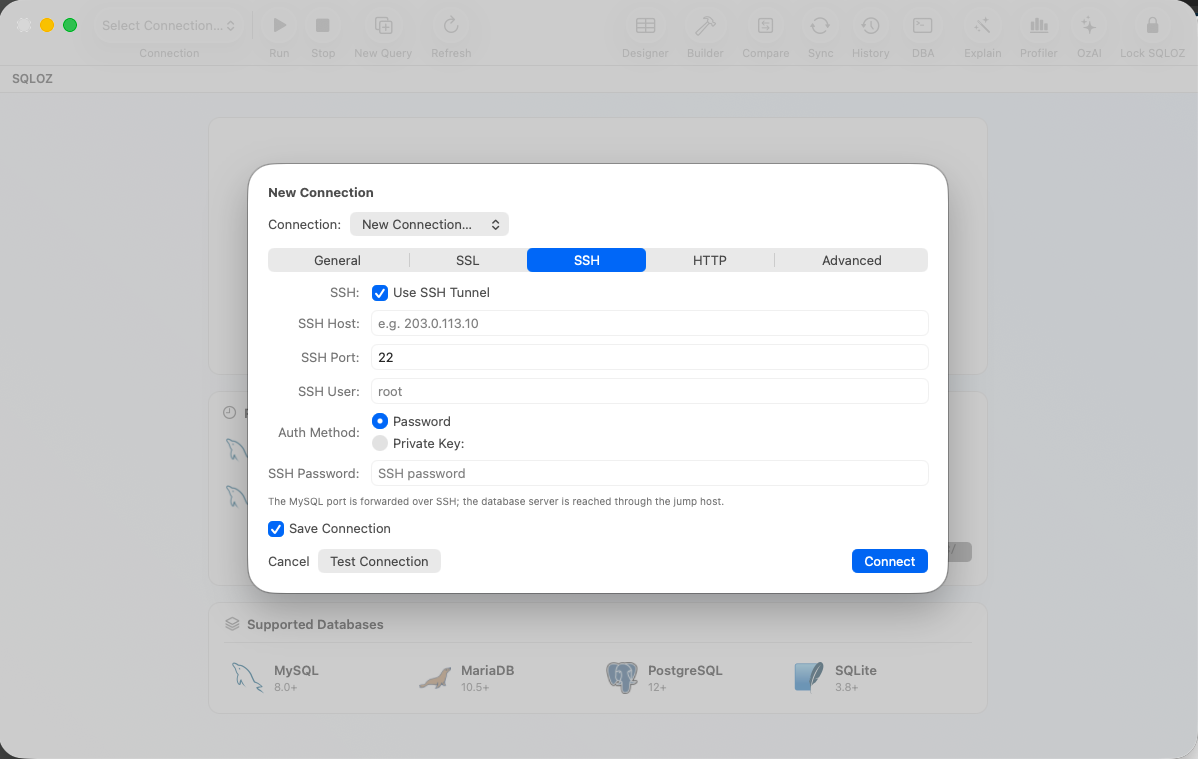
- Click on the SSH Tunnel tab and toggle Use SSH Tunnel ON.
- SSH Host: Enter your Hetzner server’s public IP address.
- SSH Port:
22(or your custom hardened SSH port). - SSH User:
rootor your non-root sudoer username. - Authentication Method: Select SSH Key File and select your private key.
- SQLOZ automatically caches key passphrases in the hardware-encrypted macOS Keychain.
Step 3: Test and Connect
Click Test Connection. SQLOZ establishes the encrypted SSH channel to Hetzner, binds to the remote MySQL socket, and opens your database in milliseconds.
3. Production Environment Safeguards
If this Hetzner server hosts your live application:
- Assign the Red Production Badge to the connection in SQLOZ.
- SQLOZ’s Safety Gate will automatically intercept queries, requiring confirmation before running any destructive
DROP TABLE,TRUNCATE, or unindexedUPDATEstatements.
Summary
Connecting to Hetzner dedicated servers should be secure, fast, and effortless. With SQLOZ, Mac developers get an integrated SSH tunnel manager that respects Hetzner’s default security architecture without exposing database ports.
Download SQLOZ for macOS and manage your Hetzner databases with native Apple Silicon speed.