Chapter 6: Schema Compare & Synchronization
Info: This chapter explains finding schema differences between two databases, displaying them visually, and the policy-driven backup/rollback safety mechanisms that engage during synchronization.
In this chapter:
6.1 Finding Schema Differences
Development and production databases drift apart over time (Schema Drift). SQLOZ detects the differences between two databases and makes the synchronization process safe.
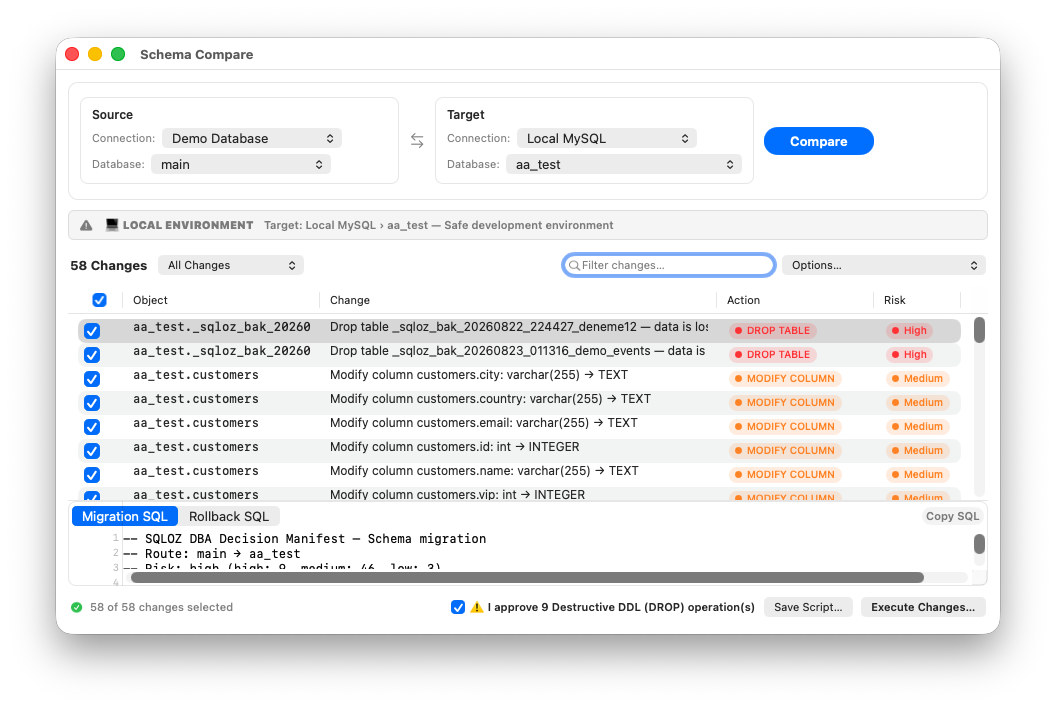
- Open Tools → Compare Schemas… from the top menu.
- Source: The reference database (e.g.
local_dev). - Target: The database to be updated (e.g.
production_db). - Press Compare.
6.2 Visual Diff Matrix
The differences are shown as a color-coded matrix.
| Color | Meaning | Generated operation |
|---|---|---|
| 🟢 Green | Present in source, missing in target | CREATE TABLE / ADD COLUMN |
| 🟡 Yellow | Present in both but different type/index | ALTER TABLE |
| 🔴 Red | Deleted in source but still in target | DROP |
Example:
SOURCE (local_dev)                | TARGET (prod_db)               | APPLICABLE ACTION
payments                          | ❌ (absent)                     | ➕ CREATE TABLE payments
users.phone_verified (BOOLEAN)    | users.phone_verified (TINYINT)  | 🔄 MODIFY COLUMN
6.3 Safety Mechanisms
When you press Apply Sync, SQLOZ evaluates change risk and configured policy before execution. The following protections apply when their prerequisites are met.
- Automatic data backup (
_sqloz_bak_...): This option is available only for MySQL/MariaDB targets. The window activates the checkbox by default. Before destructive DDL operations (DROP TABLE,DROP COLUMN,MODIFY COLUMN) run, the data of affected target tables is backed up on the live server under a generated timestamped table name. For PostgreSQL or SQLite targets, automatic table backup and backup-based rollback data are unsupported; while Auto Backup is enabled, execution and script-export actions remain disabled with an explanatory status:CREATE TABLE IF NOT EXISTS `_sqloz_bak_<generated-timestamp>_users` AS SELECT * FROM `users`; - Rollback and data-recovery script (MySQL/MariaDB): When an automatic backup was actually completed, SQLOZ produces executable rollback SQL for reversible schema changes. The same file may include a commented data-restore recipe for manually copying rows back from the verified backup table after the schema has been restored; it does not automatically restore those rows when the file is run. For PostgreSQL/SQLite, it does not emit a restore recipe that implies an automatic backup exists:
-- INSERT IGNORE INTO `users` SELECT * FROM `_sqloz_bak_<generated-timestamp>_users`; - Destructive-delete protection: If a table/column must be deleted in the target, the deletion command is not sent to the live server until the user confirms it.
Important: Turning off the
_sqloz_bak_...backup option removes that backup posture. Destructive operations still require explicit confirmation, but you should take and verify an independent backup first.
Warning: Before applying schema changes to PostgreSQL or SQLite, take your own verified backup. SQLOZ does not create an automatic safety backup for these database families, and the disabled state in the window explains this limitation.