
When building high-throughput backend APIs (in Node.js/Express, Go, Python/FastAPI, or Laravel), developers frequently debate between using an Object-Relational Mapper (ORM) vs. writing Raw Prepared SQL.
While ORMs excel at simple single-table CRUD operations, complex analytical endpoints - such as multi-table aggregated reports, leaderboard rankings, and filtered search endpoints - frequently suffer from ORM performance bugs:
- The infamous N+1 query problem,
- Inefficient subquery joins that defeat query optimizer unnesting,
- Inability to leverage database-specific indexes and window functions.
To solve this, senior engineers prototype their complex reporting queries visually, compile clean SQL, and paste parameterized queries directly into their backend repositories.
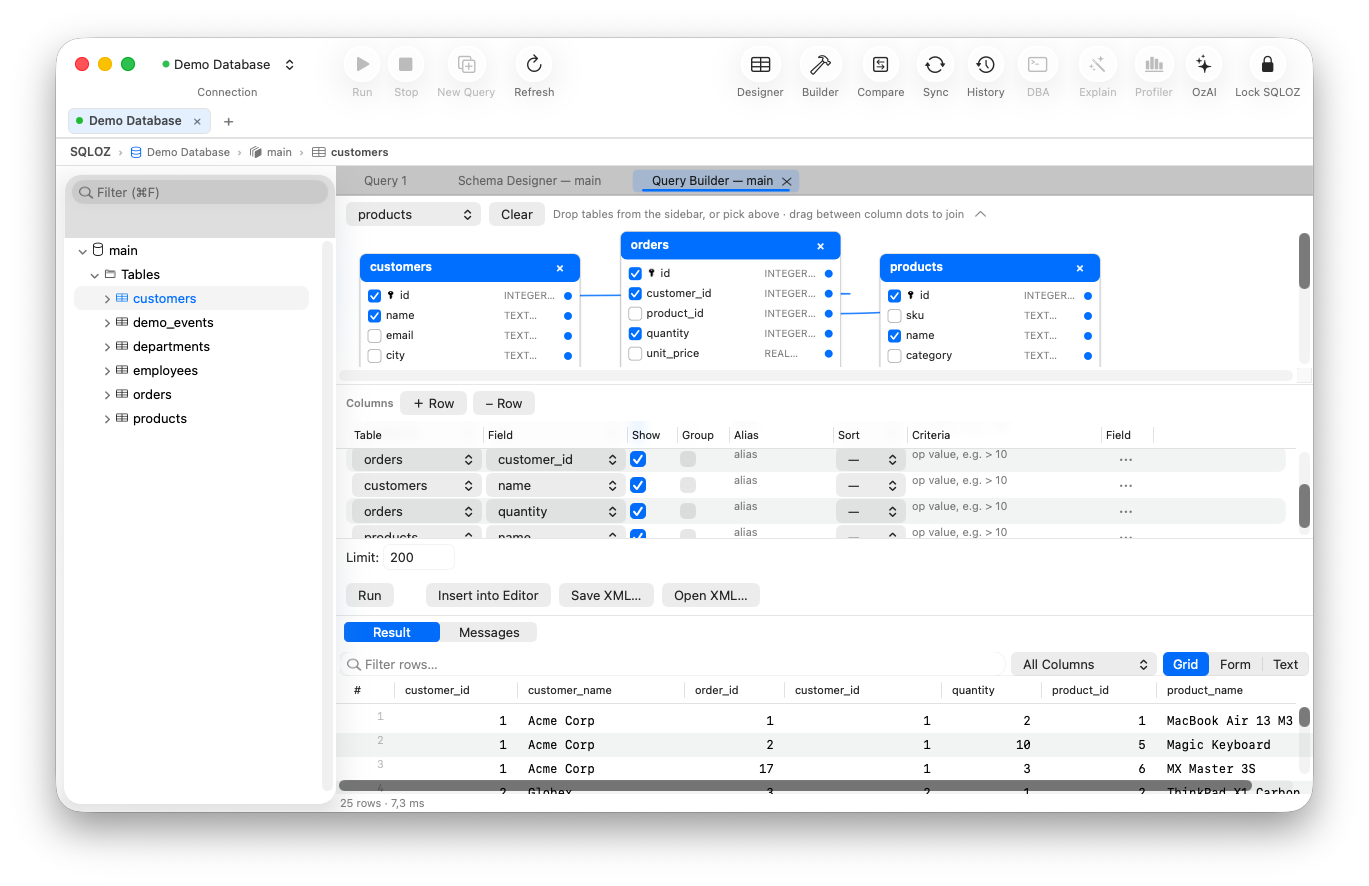
In this guide, we show you how to generate clean, production-ready SQL using SQLOZ’s Visual Query Builder on macOS.
1. Why Visual Query Prototyping Beats Hand-Coding API Queries
- Immediate Data Verification: Instead of running your backend API server, making a Postman request, and checking JSON logs, you see live query results immediately in SQLOZ’s data grid.
- SARGable AST Compilation: SQLOZ’s visual builder compiles code through an internal Abstract Syntax Tree (AST) optimizer pass that guarantees:
- Explicit column projections (zero
SELECT *waste), - Clean, readable table aliasing (
FROM orders o JOIN customers c...), - Index-friendly date and numeric boundary filters.
- Explicit column projections (zero
- Parameterization Readiness: Filter conditions are structured cleanly, making it trivial to replace literal values with prepared statement placeholders (
$1,$2in PostgreSQL or?in MySQL).
2. Step-by-Step API Query Generation Workflow
Step 1: Model the Query on the Canvas
Open the Query Builder in SQLOZ and drag your required entity tables onto the canvas. Connect foreign key join lines and check only the specific columns your API response needs.
Step 2: Configure Dynamic Filtering
Add your filter conditions (e.g., filter by tenant ID, date ranges, and status flags).
Step 3: Inspect the Live SQL Preview Panel
As you adjust filters and aggregations, SQLOZ’s Live SQL Preview panel compiles formatted, human-readable SQL in real time:
SELECT
    o.id AS order_id,
    o.total_amount,
    o.created_at,
    c.first_name,
    c.email
FROM orders o
INNER JOIN customers c ON o.customer_id = c.id
WHERE o.status = 'paid' AND o.created_at >= '2026-01-01'
ORDER BY o.created_at DESC
LIMIT 50;
Step 4: Copy Directly to Your Backend Project
Click the Copy SQL button in the preview toolbar. Paste it directly into your backend database repository and swap the hardcoded values for prepared statement variables:
// Node.js (pg / PostgreSQL example):
const query = `
    SELECT
        o.id AS order_id, o.total_amount, o.created_at,
        c.first_name, c.email
    FROM orders o
    INNER JOIN customers c ON o.customer_id = c.id
    WHERE o.status = $1 AND o.created_at >= $2
    ORDER BY o.created_at DESC
    LIMIT $3;
`;
const result = await db.query(query, ['paid', startDate, 50]);
3. Verify Query Plan Performance in OzExplain
Before deploying your generated query to production, switch to SQLOZ’s OzExplain tab.
SQLOZ analyzes the database query planner output and renders a visual execution cost tree, highlighting in red if an index scan was missed or if a sequential scan threatens production performance.
Summary
Combining the speed of visual query modeling with the raw performance of prepared SQL gives backend developers an unbeatable productivity advantage.
With SQLOZ, Mac developers can prototype, optimize, and export production-ready SQL for their backend services in seconds.
Download SQLOZ for macOS and accelerate your backend API development today.