
As applications scale from minimal prototypes to distributed systems, relational integrity often lags behind. A developer might introduce an orders table with a customer_id column, but omit the explicit foreign key constraint to keep early migrations fast and flexible.
Months later, the database contains millions of records, and bad application code or manual database tweaks have introduced orphaned rows - orders referencing customer_id values that no longer exist in the customers table.
Attempting to add a foreign key constraint to an existing production table with raw ALTER TABLE ... ADD CONSTRAINT will typically fail with a constraint violation error or, worse, hold an exclusive table lock that locks out all incoming web traffic.
In this guide, we walk through identifying orphaned records, enforcing constraints safely using two-phase DDL in PostgreSQL, and managing relational integrity in native macOS database tooling.
Step 1: Discovering Orphaned Records Before Altering the Schema
Before you attempt to create a foreign key, you must verify that 100% of existing rows in the child table reference valid rows in the parent table.
Finding Orphaned Rows via LEFT JOIN ... IS NULL:
SELECT
    o.id AS orphaned_order_id,
    o.customer_id AS missing_customer_id,
    o.created_at
FROM orders o
LEFT JOIN customers c ON o.customer_id = c.id
WHERE c.id IS NULL
  AND o.customer_id IS NOT NULL
LIMIT 50;
Remediation Options for Orphaned Records:
- Assign to a Dummy Entity: Update orphaned rows to point to a designated fallback record (e.g.,
customer_id = 1for “Unknown / Deleted Customer”). - Set Null: If the column allows
NULL, setcustomer_id = NULL. - Delete Corrupt Rows: Archive or delete the orphaned records if they represent broken transactional artifacts.
Step 2: The Production Locking Hazard
In both MySQL and PostgreSQL, running a simple:
-- DANGEROUS ON HIGH-TRAFFIC PRODUCTION TABLES
ALTER TABLE orders
ADD CONSTRAINT fk_orders_customer_id
FOREIGN KEY (customer_id) REFERENCES customers(id);
executes an immediate sequential scan of the entire child table while holding an exclusive lock. On a table with 15 million records, this verification scan can block application writes for several minutes, causing connection pool exhaustion.
Step 3: The Safe Two-Phase Constraint Pattern in PostgreSQL
PostgreSQL provides a zero-downtime architectural pattern using the NOT VALID clause:
Phase 1: Create the Constraint Instantly (Zero Scan Lock)
-- Acquires a brief lock to register the constraint metadata
-- All NEW or UPDATED rows will now be strictly validated!
ALTER TABLE orders
ADD CONSTRAINT fk_orders_customer_id
FOREIGN KEY (customer_id) REFERENCES customers(id)
NOT VALID;
This statement executes in milliseconds because PostgreSQL does not validate existing rows immediately.
Phase 2: Validate Existing Rows Concurrently
-- Scans historical rows concurrently WITHOUT taking an exclusive write lock!
ALTER TABLE orders
VALIDATE CONSTRAINT fk_orders_customer_id;
If historical rows pass validation, the constraint is marked fully valid. Application traffic continues reading and writing unimpeded.
Step 4: Adding Foreign Keys Safely in MySQL 8.0+
MySQL does not support NOT VALID, but it supports Online DDL algorithms for foreign key additions under specific conditions:
-- Prerequisite: Ensure an index already exists on the referencing column!
CREATE INDEX idx_orders_customer_id ON orders(customer_id);

-- Add constraint with INPLACE algorithm to avoid full table rebuild
ALTER TABLE orders
ADD CONSTRAINT fk_orders_customer_id
FOREIGN KEY (customer_id) REFERENCES customers(id)
ON DELETE RESTRICT,
ALGORITHM=INPLACE,
LOCK=NONE;
[!IMPORTANT] If an index does not already exist on
customer_id, MySQL will attempt to create one implicitly while adding the constraint, which forces a table lock. Always create the secondary index first before applying the foreign key!
Step 5: Visual Integrity Management with SQLOZ (macOS Native)
Designing and maintaining relational schemas across large teams is significantly safer with visual modeling tools.
SQLOZ includes an interactive Visual Schema Designer & Integrity Inspector built natively with Apple Metal.
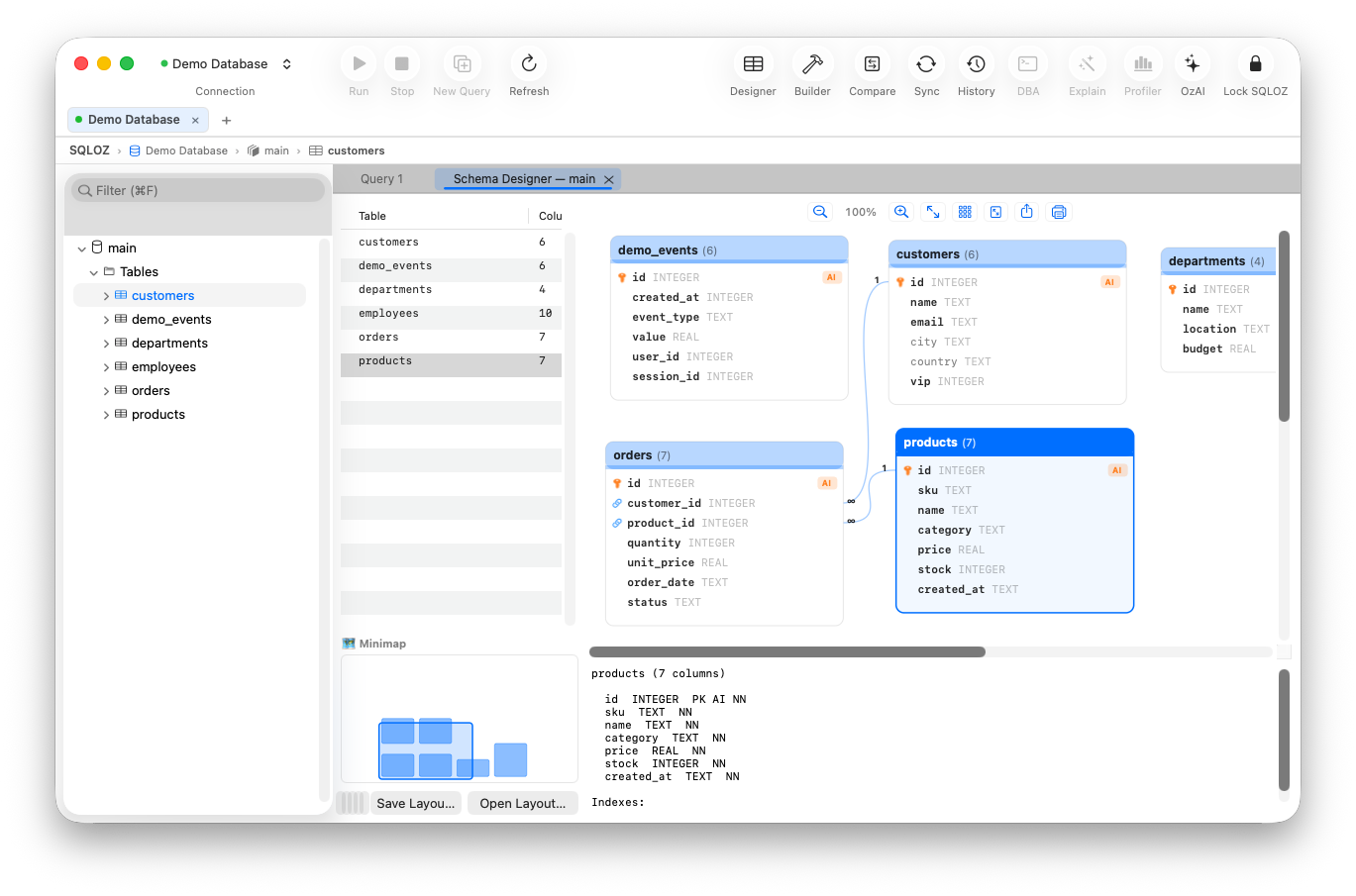
How SQLOZ Safeguards Constraint Creation:
- Pre-flight Orphan Scanner: Before generating DDL, SQLOZ automatically runs background queries to check for orphaned records and displays a clean list of violating keys if found.
- Interactive Visual Linking: In the Visual Schema Designer, drag and drop a line from
orders.customer_idtocustomers.id. Select cascading behaviors (RESTRICT,CASCADE,SET NULL) from visual dropdowns. - Engine-Specific Safe DDL Generation: SQLOZ automatically detects whether you are connected to PostgreSQL or MySQL. For PostgreSQL, it generates the safe two-phase
NOT VALIDscript; for MySQL, it verifies index presence before applyingALGORITHM=INPLACE. - Draft Diff Review: Inspect the exact SQL migration script in a visual diff inspector before applying it to your server.
Summary
Enforcing foreign key constraints preserves relational data integrity, but retrofitting them onto active production tables requires careful planning. Clean orphaned data first, leverage engine-specific concurrent DDL patterns, and use native tools like SQLOZ to prevent production locking outages.
To learn more about relational database design, read our guides on How to Find Orphaned Records Using a Visual Query Builder and Understanding SQL Table Relationships and Foreign Keys.