
Modern engineering teams rarely work with a single database. A typical developer’s daily workflow involves switching between:
- A local Docker or SQLite development instance on their Mac.
- A shared cloud Staging cluster on AWS RDS or DigitalOcean for QA and feature testing.
- A high-availability Production primary and read replica behind private VPC bastion hosts.
When multiple database tabs look identical in a generic GUI, human error is inevitable. Every developer has heard the horror story of an engineer executing a TRUNCATE or cleanup script intending to wipe a local seed database, only to discover too late that their active tab was connected to the production cluster.
In this guide, we discuss strategies for organizing complex multi-tier database connections, securing access with SSH bastions, and using macOS-native environment guards to make disastrous mix-ups impossible.
1. Connection Isolation & Secure Bastion Architecture
Directly exposing production databases to the public internet via port 3306 or 5432 is a major security vulnerability. Production instances should always reside within private VPC subnets, accessible only through hardened SSH bastion hosts or VPNs.
The SSH Tunnel Configuration Pattern
# Terminal local port forward
ssh -N -L 3307:private-db-host.internal:3306 deploy@bastion.example.com -i ~/.ssh/id_ed25519
While running manual background SSH tunnels in macOS Terminal tabs works, it creates messy background processes that frequently drop connections or conflict with local ports after system sleep.
2. Environment Visual Color-Tagging: The First Line of Defense
The single most effective safeguard against accidental production mistakes is instant visual environment differentiation.
If your database client displays the exact same gray tab styling for your local test database and your production payment cluster, your brain will eventually treat them as equivalent during late-night debugging.
Industry-Standard Color Semantics:
- Green / Blue (Development & Local): Safe for rapid iteration, ad-hoc
DROP TABLE, destructive seeding, and arbitrary DDL experiments. - Amber / Orange (Staging & QA): Shared test data. Requires awareness of active QA test suites and automated CI pipeline runs.
- Vibrant Red (Production): High-stakes customer data. High-severity restrictions apply.
3. Managing Multi-Tier Environments in SQLOZ (macOS Native)
Designed specifically for Apple Silicon and macOS, SQLOZ provides built-in multi-environment management with hardware-backed security.
What SQLOZ Delivers:
- Visual Environment Banners & Badges: Every connection profile in SQLOZ can be designated as
Local,Development,Staging, orProduction. When a Production connection is selected:- The entire window header, status bar, and tab bar adopt a distinct, high-contrast Red accent.
- A persistent
PRODUCTION [READ/WRITE]badge appears prominently next to the query execution button.
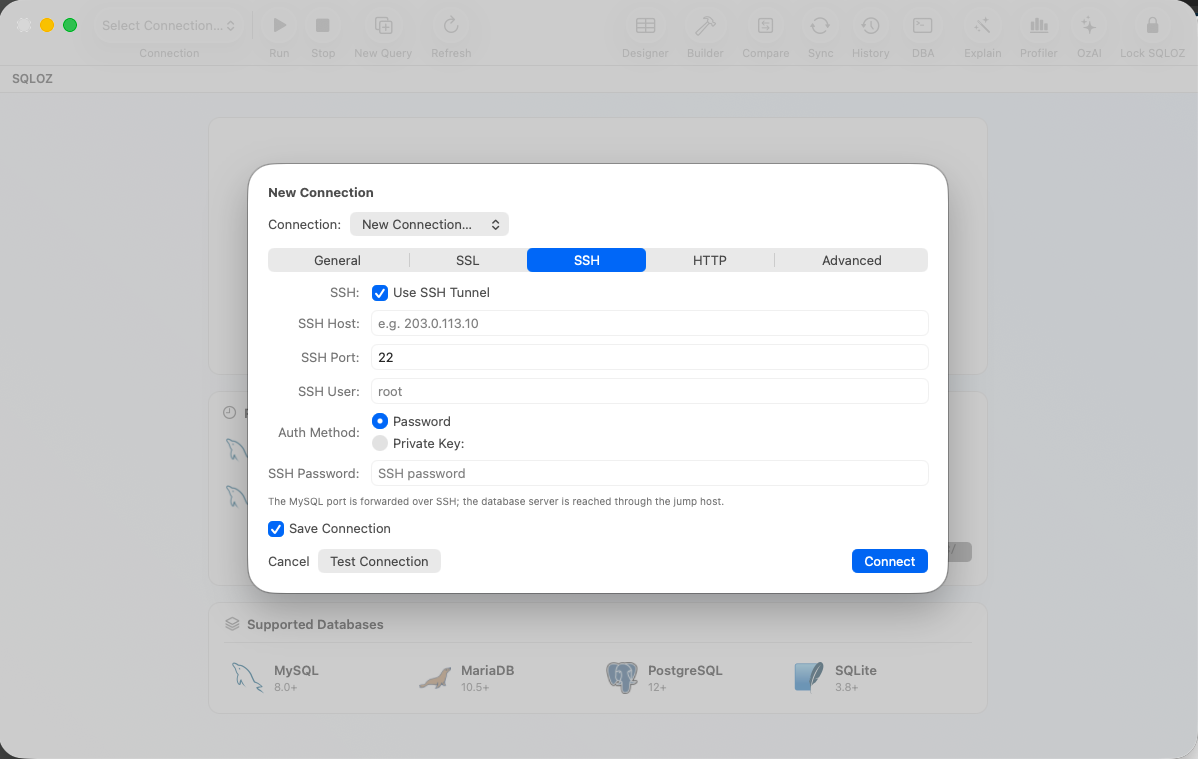
- Integrated Auto-Reconnecting SSH Tunnels: Configure your private host, port, bastion gateway, and SSH key (
id_ed25519orid_rsa) directly in the connection sheet. SQLOZ establishes the encrypted tunnel natively via Swift networking, monitoring tunnel heartbeat pings and automatically reconnecting when your MacBook wakes from sleep. - macOS Keychain Hardware Encryption: All passwords, private keys, and SSH passphrases are stored in the secure macOS Keychain backed by the Apple Secure Enclave - never in plain text configuration files.
- The DML Safety Gate: When working inside a tagged Production tab, SQLOZ automatically intercepts unconstrained
UPDATEandDELETEqueries, preventing accidental global overwrites before commands reach the server.
4. Comparing and Synchronizing Across Environments
When a new feature works in Staging but fails in Production, the culprit is often schema drift: a missing index, an altered column type, or an unapplied migration script.
SQLOZ includes native Schema Compare & Attended Data Sync tools built specifically for cross-environment verification:
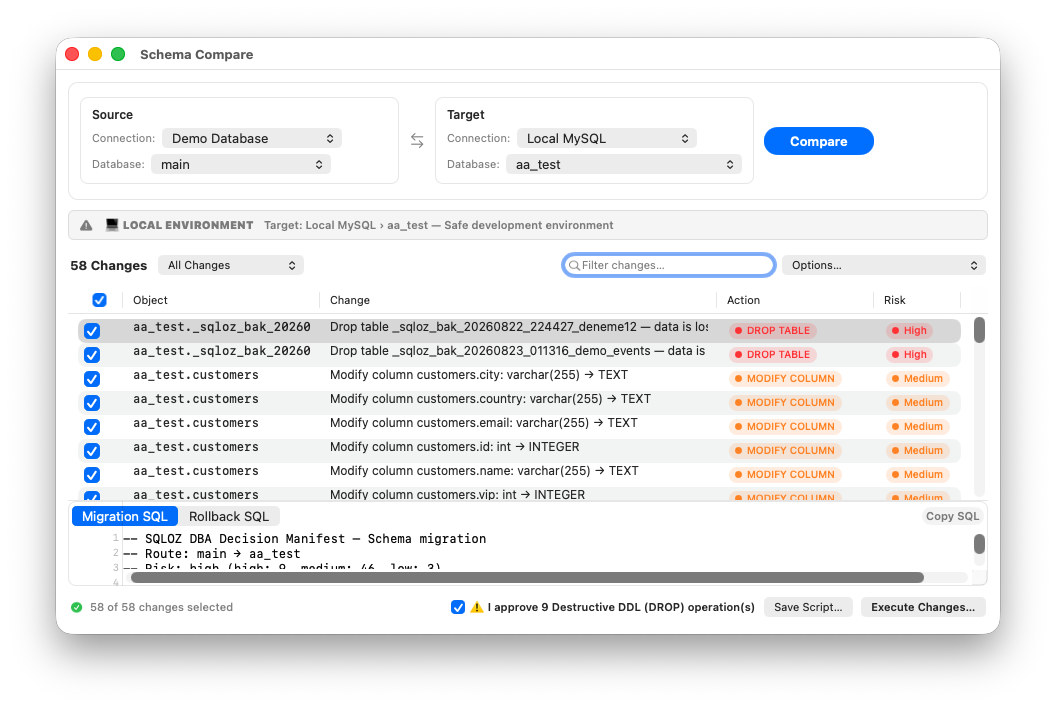
- One-Click Schema Diff: Compare your Staging schema directly against Production. SQLOZ compiles a visual side-by-side AST difference tree and generates safe
ALTERstatements to bring environments back into parity. - Row-Level Attended Sync: Compare reference tables (such as configuration parameters or lookup catalogs) between databases with visual conflict resolution and row-level repair.
Summary
Managing multiple database environments safely requires a combination of network isolation, strict visual environment cues, and automated query safeguards. By adopting tools like SQLOZ that enforce environment isolation natively on macOS, engineering teams can eliminate production anxiety and iterate faster.
For related workflows on connection security and schema management, read our guides on How to Connect to Remote MySQL Databases via SSH Tunnels on macOS and Best Cross-Database Migration GUI Tools for macOS in 2026.