
The Laravel ecosystem has always prioritized exceptional developer experience (DX). From Artisan CLI and Eloquent ORM to Herd, Forge, and Vapor, Laravel tooling is designed to be fast, expressive, and intuitive.
However, when interacting with the database layer, Laravel developers frequently face a dilemma. While php artisan migrate handles schema versioning, inspecting live rows, profiling complex Eloquent queries, and diagnosing foreign key constraints requires a graphical database client.
With Laravel now defaulting to local SQLite for new projects while deploying to MySQL or PostgreSQL in production, having a Mac client that supports multi-engine workflows effortlessly is critical.
In this guide, we evaluate the best database GUI tools for Laravel developers on macOS, examining how each handles Eloquent migrations, SSH tunnels, and cross-database environments.
What Laravel Developers Need in a Database GUI
Laravel’s architecture introduces specific database workflow patterns:
- Seamless SQLite & MySQL/Postgres Support: Instant opening of local
.sqlitedatabases created by Laravel 11/12, alongside connections to remote cloud databases. - Migration & Schema Safety: Guardrails that prevent developers from running raw
DROPorTRUNCATEqueries against production databases instead of using Artisan migrations. - Foreign Key & Relationship Visualizers: Quick inspection of
hasMany,belongsTo, and polymorphic relation tables without writing manualJOINqueries. - SSH Bastion Security: Connecting to production databases hosted on AWS RDS or DigitalOcean behind Laravel Forge or custom VPC bastions.
1. SQLOZ (Native Swift & Metal) - The Modern Winner
SQLOZ is engineered natively in Swift and Metal specifically for macOS, making it a natural companion to modern Laravel development environments like Laravel Herd.
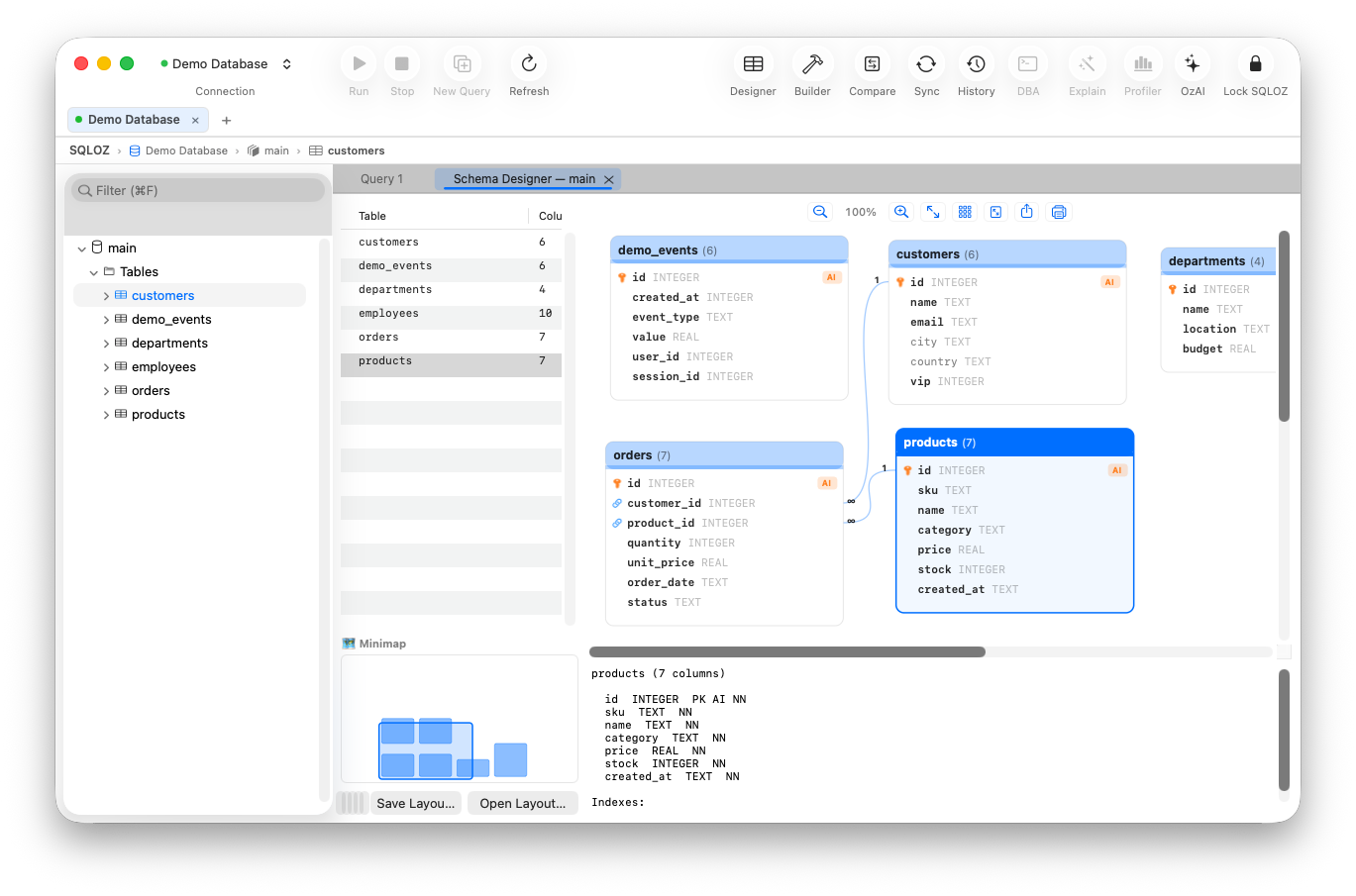
Why Laravel Developers Love SQLOZ:
- Instant SQLite Drag-and-Drop: Drag your project’s
database/database.sqlitefile onto the SQLOZ dock icon to open and inspect tables instantly. - Visual Eloquent Mapping: The Visual Schema Designer automatically parses foreign keys (
user_id,order_id), visualizing your Eloquent relationships on an interactive 120 FPS canvas. - One-Click Local SQLite to Production Sync: Developing on SQLite locally but deploying to MySQL on Laravel Forge? SQLOZ’s Cross-Dialect Migration Tool streams your local database directly to remote MySQL or PostgreSQL in seconds.
- Production Color Tagging & Safety Gate: Tag your Forge or Vapor database with a high-contrast Red badge. If you run a dangerous
UPDATEorDELETEwithout aWHEREclause, SQLOZ’s Safety Gate halts execution immediately. - Ultra-Low Memory Footprint: Idles at just 45 MB to 75 MB of RAM, preserving system memory for PHP-FPM and Vite dev servers.
2. TablePlus
TablePlus has long been a staple in the PHP community:
- Pros: Native macOS interface, inline row editing, support for multiple tabs.
- Cons: Strict 2-workspace/tab limits on the free tier, and lacks built-in visual ER schema design or cross-dialect database migration tools.
3. Sequel Ace
An open-source fork of the classic Sequel Pro:
- Pros: Free, familiar interface for veteran Laravel developers who grew up with Sequel Pro.
- Cons: Strictly limited to MySQL and MariaDB - zero support for SQLite or PostgreSQL, making it incompatible with modern Laravel’s default SQLite workflows. Prone to stability hiccups on newer macOS versions.
Feature Comparison for Laravel Workflows
| Feature | SQLOZ | TablePlus | Sequel Ace |
|---|---|---|---|
| Engine Support | MySQL, PostgreSQL, SQLite | MySQL, PostgreSQL, SQLite, etc. | MySQL / MariaDB only |
| Local SQLite File Handling | Instant drag & drop / sandbox safe | Manual file picker | ❌ Not supported |
| Cross-Dialect Migration | Built-in (SQLite $\leftrightarrow$ MySQL/Postgres) | ❌ Requires manual scripts | ❌ Not supported |
| Visual Schema Designer | Metal-accelerated ER canvas | ❌ Not available | ❌ Not available |
| Production Safety Gate | Intercepts WHERE-less DML | ❌ Standard confirm prompt | ❌ Basic prompt |
| Memory Footprint | ~60 MB | ~185 MB | ~150 MB |
Best Practice: Managing Laravel Database Workflows on Mac
To maximize productivity and safety:
- Local Development with Laravel Herd & SQLite: Keep local development fast and zero-config with native SQLite.
- Inspect with SQLOZ: Open your
database.sqlitein SQLOZ to verify seeds and factory outputs visually. - Use SSH Bastions for Production: Configure your Laravel Forge SSH key in SQLOZ’s connection sheet for secure, encrypted remote access without opening public database ports.
Summary
For macOS developers building applications with Laravel, SQLOZ delivers the ideal combination of Apple Silicon performance, multi-engine flexibility, and built-in schema visualization.
To learn more about optimizing Laravel database workflows, read our step-by-step guide on Moving Laravel SQLite to MySQL in Production and check out How to Connect to Remote Databases via SSH Tunnels on macOS.