
Starting a new project with SQLite is one of the joys of modern software development. Whether you are bootstrapping a Laravel app, a Next.js prototype with Prisma, or a Python FastAPI service, SQLite gives you a zero-configuration, zero-latency local database that lives directly in your project folder.
However, as your application grows, you eventually hit the ceiling of single-writer concurrency. You need connection pooling, row-level locking, rich JSONB operations, and horizontal scalability. It’s time to graduate to PostgreSQL (or cloud services like Supabase, Neon, or AWS RDS).
Traditionally, converting SQLite to PostgreSQL requires:
- Writing fragile Python transformation scripts with
sqlite3andpsycopg2. - Dealing with missing schema constraints and loose type affinity.
- Manually fixing primary key sequences that break on your very first production
INSERT.
In this tutorial, we explain how to migrate your SQLite database to PostgreSQL cleanly and safely on a Mac - without writing a single line of script code.
1. The Core Obstacles in SQLite to PostgreSQL Migration
SQLite and PostgreSQL represent opposite ends of the architectural spectrum. Migrating between them exposes three major landmines:
A. Loose Type Affinity vs. Strict PostgreSQL Types
In SQLite, column types are suggestions, not rules. You can store the string 'twenty' inside an INTEGER column without an error.
PostgreSQL, on the other hand, enforces absolute type discipline. If your SQLite database contains inconsistent dirty records, a naive dump will abort immediately upon importing into PostgreSQL.
B. Boolean Discrepancies
SQLite does not have a distinct BOOLEAN storage class; it uses integer values 0 (false) and 1 (true). When transferring to PostgreSQL, these values must be mapped to native PostgreSQL BOOLEAN literals ('t' and 'f'), or your application queries will fail with type mismatch errors:
-- Will fail in PostgreSQL if status is BOOLEAN:
SELECT * FROM users WHERE is_active = 1;
-- Error: operator does not exist: boolean = integer
C. The Dreaded Sequence Desynchronization
In PostgreSQL, auto-incrementing identity columns rely on an internal sequence generator (pg_sequences). When you insert explicit primary key IDs from SQLite into PostgreSQL, PostgreSQL does not advance the sequence counter.
When your application attempts its first insert:
ERROR: duplicate key value violates unique constraint "users_pkey"
DETAIL: Key (id)=(1) already exists.
2. Why Python and Shell Migration Scripts Break
Many developers search GitHub for tools like sqlite3-to-postgres.py or pgloader. While useful in theory, in practice:
- Common Lisp / Python Dependencies: Installing libraries and managing Python virtual environments or Homebrew formula compilation issues on Apple Silicon wastes hours.
- Lack of Verification: CLI tools give you a text log, but you cannot inspect diffs, examine column mapping adjustments, or preview data before committing to production.
- No Rollback Protection: If a script fails midway through a 50-table schema, you are left with a half-populated database and orphan records.
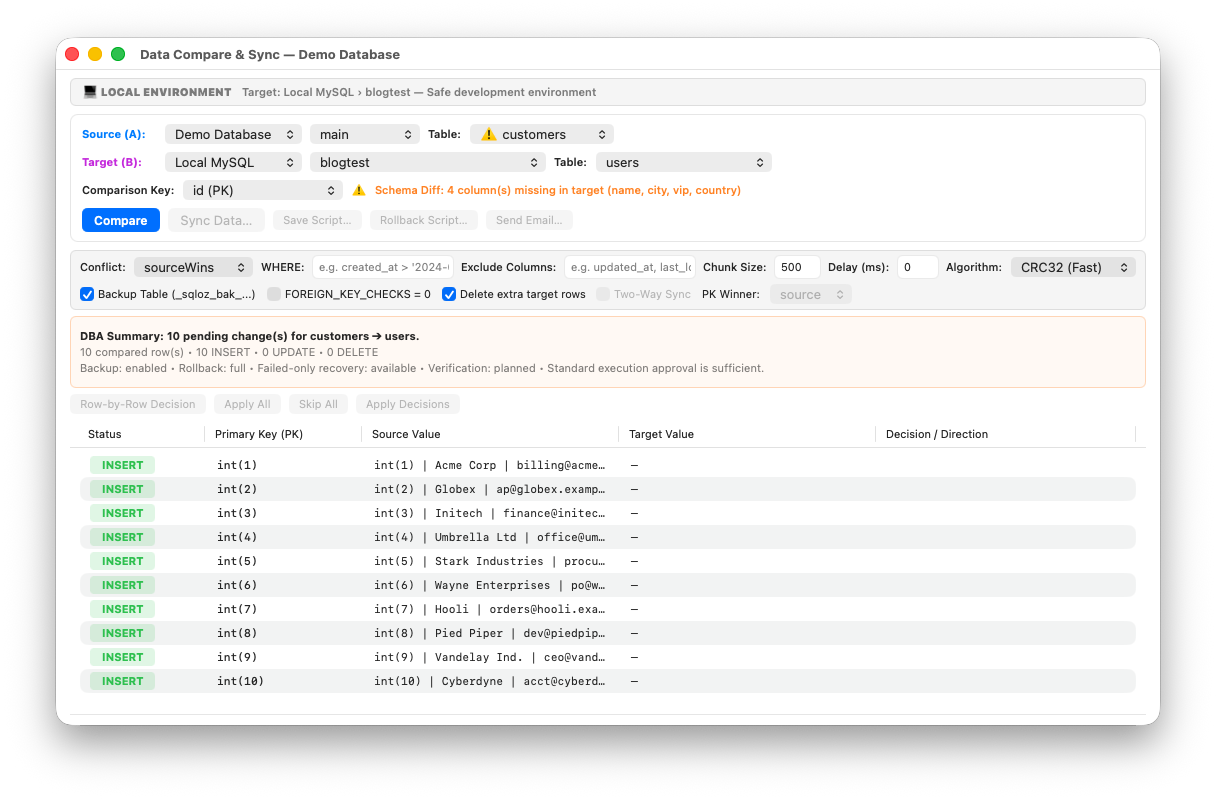
3. The One-Click Migration Workflow in SQLOZ
SQLOZ is a native macOS database client written in Swift and Metal that features an integrated, cross-dialect migration engine. It handles schema translation, data transformation, and sequence synchronization automatically.
Step 1: Connect Both Databases in SQLOZ
- Open SQLOZ on your Mac.
- In the left Object Browser, open your local
.sqliteor.dbfile. - In the same window, connect to your target PostgreSQL database (or cloud instance like Supabase).
Step 2: Launch the Cross-Dialect Migration Wizard
Right-click your SQLite database in the sidebar and select Migrate to PostgreSQL…
Step 3: Automated Dialect Translation
SQLOZ inspects your SQLite schema and compiles a clean, native PostgreSQL DDL:
- Transforms
INTEGER PRIMARY KEY AUTOINCREMENTinto modern PostgreSQLBIGINT GENERATED BY DEFAULT AS IDENTITY. - Converts integer booleans (
0/1) into true PostgreSQLBOOLEANfields. - Preserves text timestamps and normalizes them into
TIMESTAMPTZ. - Recreates foreign key constraints with safe verification.
Step 4: High-Performance Binary Ingestion
Click Migrate. SQLOZ streams rows from the SQLite engine directly into PostgreSQL using binary COPY ... FROM STDIN. Because this runs natively in memory without writing temporary text dumps to disk, transfers complete in a fraction of the time of Python scripts.
Step 5: Automated Sequence Alignment
Immediately following data ingestion, SQLOZ automatically executes setval() across every identity sequence in your target database, setting the counter to MAX(id). Your application can begin writing new records instantly without sequence collision crashes!
4. Validating Your PostgreSQL Database
Before routing production traffic to PostgreSQL:
- Check Row Parity: Verify live row counts across both engines in the SQLOZ sidebar.
- Explore Relationships: Open the Schema Designer (read our guide on visualizing foreign keys) to confirm table topologies match.
- Run a Test Write: Insert a dummy record through SQLOZ to confirm sequence generation functions smoothly.
Summary
Migrating from SQLite to PostgreSQL is a major milestone in your project’s lifecycle. Don’t let fragile command-line scripts turn it into a high-stress ordeal.
With SQLOZ, Mac developers can migrate complex schemas and millions of rows cleanly, accurately, and visually in seconds.
Download SQLOZ for macOS and graduate your local SQLite project to production PostgreSQL today.