
An orphaned record is a child row whose foreign key points to a parent primary key that no longer exists.
Orphaned records are common in databases where:
- Foreign key constraints were disabled during high-volume bulk migrations,
- An application deleted user records with
DELETE FROM userswithout cascading deletes to dependent tables (such asorders,user_logs, orcomments), - Legacy MyISAM tables without foreign key enforcement were migrated to InnoDB.
Orphaned records silently pollute your database, causing analytics metrics to desynchronize, wasting disk space, and triggering null-pointer exceptions in backend ORM models.
In this tutorial, we show you how to detect and clean up orphaned records visually on macOS using SQLOZ.
1. The Relational Technique: LEFT JOIN WHERE IS NULL
The standard SQL technique for finding orphaned rows is executing an outer join from the child table to the parent table, and filtering for rows where the parent primary key is NULL:
-- Find orders whose customer_id references a non-existent user:
SELECT o.id, o.customer_id, o.total_amount
FROM orders o
LEFT JOIN users u ON o.customer_id = u.id
WHERE u.id IS NULL;
If this query returns records, every returned row is an orphan that cannot be associated with any real user.
2. Detecting Orphaned Records Visually in SQLOZ
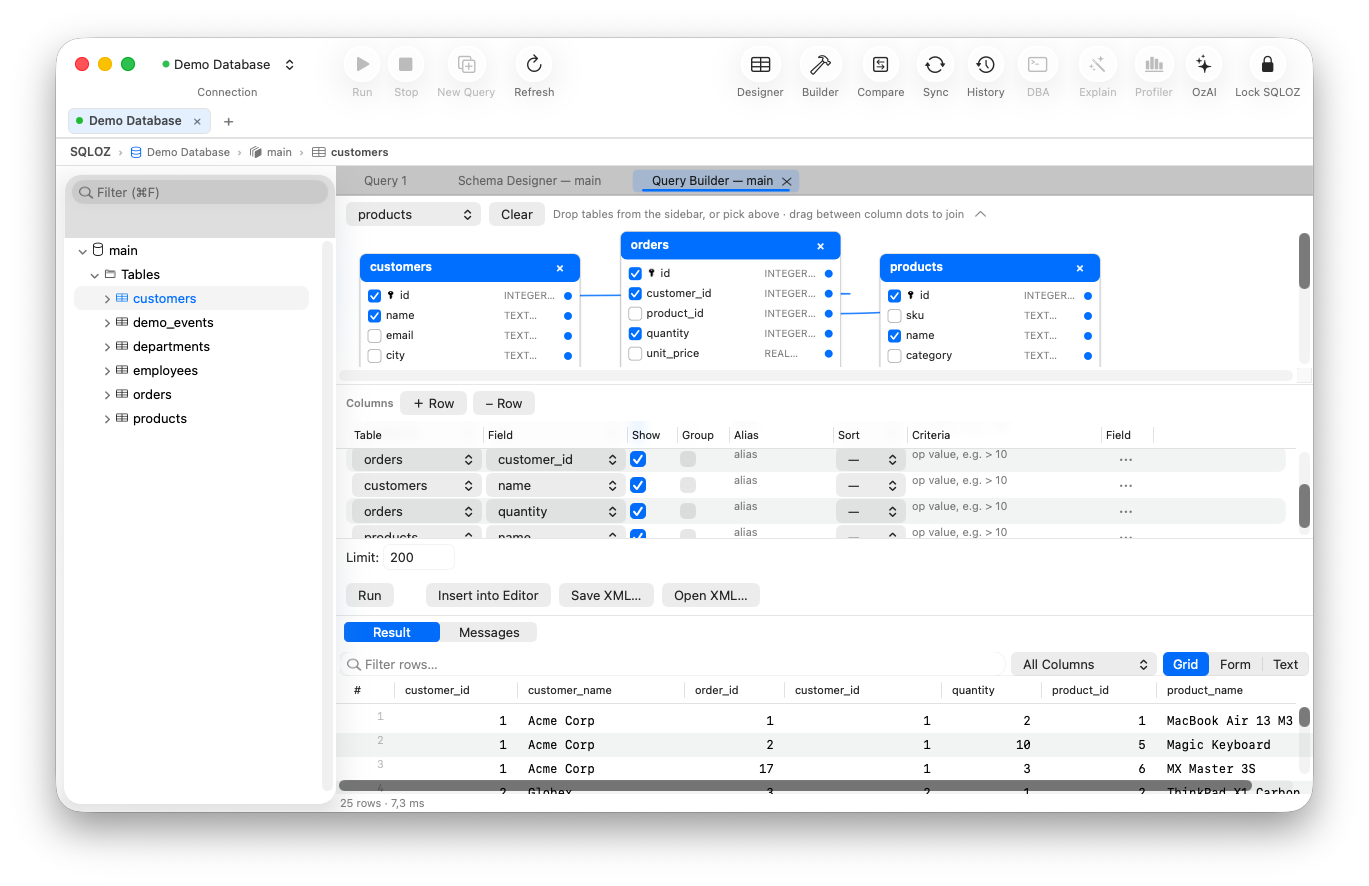
With SQLOZ’s Visual Query Builder, you can model this query in less than 30 seconds without writing code:
Step 1: Drag Child and Parent Tables
Open the Query Builder in SQLOZ and drag orders (the child table) and users (the parent table) onto the canvas.
Step 2: Configure a LEFT JOIN
- Drag a line from
orders.customer_idtousers.id. - Click the connector line badge and toggle the join type to LEFT JOIN.
Step 3: Add the IS NULL Filter Pill
- In the bottom Conditions panel, click + Add Condition.
- Select
users.id➔ Operator: is null.
Step 4: Run and Inspect
Press ⌘R. SQLOZ displays all orphaned orders directly in the data grid. You can inspect creation timestamps, amounts, and metadata to determine when and why the records were detached.
3. Safely Cleaning Up Orphaned Records
Before deleting orphaned records, enterprise safety is paramount:
- Export a Backup Snapshot: Click Export ➔ CSV in SQLOZ to preserve an audit record of the orphaned IDs before deletion.
- Execute with Safety Gate Protection: SQLOZ’s integrated Safety Gate ensures that cleanup queries run within explicit transaction blocks, allowing you to verify affected row counts before committing changes.
-- Clean up verified orphans:
DELETE FROM orders
WHERE customer_id NOT IN (SELECT id FROM users);
Summary
Orphaned records compromise database integrity and create subtle application bugs.
With SQLOZ, Mac developers and DBAs can visually spot relational orphans, inspect root causes, and restore referential integrity with confidence.
Download SQLOZ for macOS and audit your database integrity today.