
Modern web frameworks - including Laravel 11/12, Next.js with Prisma, Django, and Rails - increasingly encourage developing locally with SQLite.
The appeal is clear: local SQLite requires zero server installation, runs cold and silent, starts up instantly, and consumes no background RAM or battery power.
However, when a feature is ready for QA, staging, or production deployment, the development team must transition to a cloud database like PostgreSQL on Supabase/AWS RDS or MySQL on DigitalOcean. At this stage, developers often hit dialect friction:
- SQLite’s dynamic type affinity conflicts with strict PostgreSQL column types.
- Auto-incrementing primary keys lose their sequence counters during dumb SQL dump and restore operations.
- Boolean representations (
0/1vstrue/false) cause runtime exceptions in backend APIs.
In this guide, we review architectural best practices for maintaining multi-dialect parity and demonstrate how to transition from local SQLite to cloud databases seamlessly on macOS.
1. Dialect Differences to Watch Between SQLite and Postgres/MySQL
| Feature / Concept | SQLite (Local Dev) | PostgreSQL (Production) | MySQL (Production) |
|---|---|---|---|
| Type Affinity | Dynamic (stores any value in any column) | Strict static typing (INTEGER, TEXT, TIMESTAMPTZ) | Strict static typing |
| Booleans | Integer literals (0 and 1) | Native BOOLEAN (true / false) | TINYINT(1) |
| Auto-Increment PK | INTEGER PRIMARY KEY AUTOINCREMENT | GENERATED ALWAYS AS IDENTITY or SERIAL | INT AUTO_INCREMENT |
| JSON Support | Basic text storage with JSON1 functions | Native binary jsonb with GIN indexing | Native binary JSON |
| Foreign Keys | Disabled by default (requires PRAGMA foreign_keys=ON;) | Always strictly enforced | Always strictly enforced (InnoDB) |
2. The Traditional Flawed Migration Pipeline
Many developers attempt to transition using generic SQL dump scripts:
# Export SQLite to raw text dump
sqlite3 dev.db .dump > dump.sql

# Attempt to import into PostgreSQL
psql -U postgres -d prod_db < dump.sql
# FAILS: Syntax errors on CREATE TABLE, incompatible PRAGMA directives, invalid quotes!
Because SQLite SQL dumps contain SQLite-specific PRAGMAs and lack strict PostgreSQL syntax, terminal imports fail almost immediately. Developers are forced to spend hours writing custom Python or Node.js parsing scripts to transform SQL dialects.
3. The Modern Solution: One-Click Cross-Dialect Migration in SQLOZ
Rather than wrestling with custom migration scripts, SQLOZ includes a native Cross-Dialect Migration Engine built directly into its macOS interface.
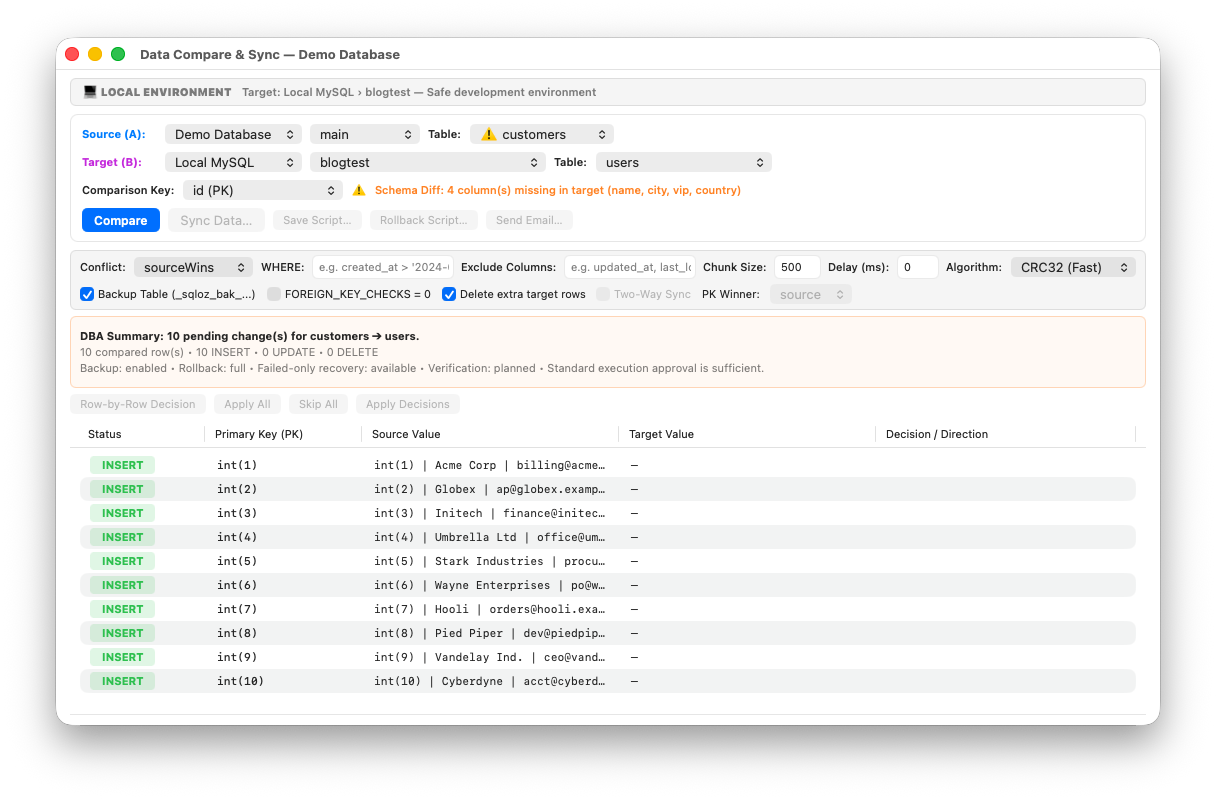
How SQLOZ Automates the SQLite $\rightarrow$ Cloud Transition:
- Drag and Drop SQLite File: Drag your local
database.sqlitefile into SQLOZ to open your local schema. - Select Cloud Target: Open your remote PostgreSQL or MySQL connection tab (configured via secure SSH bastion or direct SSL connection).
- Trigger Cross-Dialect Migration: Choose Tools $\rightarrow$ Cross-Dialect Database Migration….
- Intelligent Type Casting: SQLOZ’s compiler automatically maps dynamic SQLite types to optimal production equivalents:
- SQLite
INTEGER (0/1)$\rightarrow$ PostgreSQLBOOLEAN. - SQLite text timestamps $\rightarrow$ PostgreSQL
TIMESTAMPTZ. - SQLite primary keys $\rightarrow$ PostgreSQL
GENERATED ALWAYS AS IDENTITYsequences.
- SQLite
- Automatic Sequence Realignment: After transferring records, SQLOZ automatically recalculates and sets sequence counters (
setval()), ensuring your production application can insert new records immediately without “duplicate key” errors. - In-Memory Binary Streaming: Data streams directly between socket buffers in memory at wire speeds without generating intermediate dump files on disk.
4. Validating Parity with Schema Compare
After migrating your data, verifying that tables, column types, and foreign keys match is critical.
SQLOZ’s native Schema Compare tool lets you diff your local SQLite schema against your remote cloud database side-by-side:
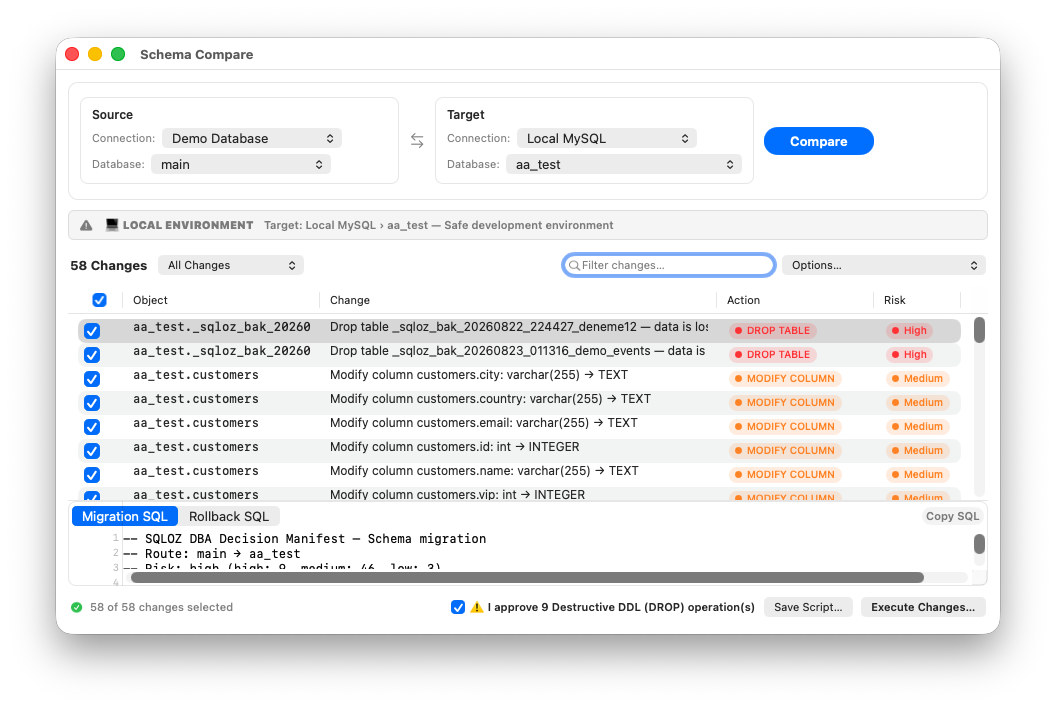
- Detect any missing indexes or foreign keys that may have been omitted during migration.
- Generate clean, idempotent SQL scripts to bring staging and production databases into 100% architectural alignment.
Summary
Developing on SQLite locally gives you maximum development speed, but shipping to cloud databases requires dependable migration tools. By understanding dialect differences and leveraging the native cross-dialect migration engine in SQLOZ, developers can transition from local prototypes to production cloud clusters in seconds.
To learn more about cross-dialect database workflows, read our tutorials on One-Click MySQL to PostgreSQL Migration on macOS and How to Migrate Local SQLite to Supabase PostgreSQL.