
Switching your production infrastructure from MySQL to PostgreSQL is one of the most impactful architectural decisions an engineering team can make. PostgreSQL’s rich JSONB indexing, robust concurrency control (MVCC), extensible type system, and superior transactional DDL support make it the default engine for modern scalable backends.
However, cross-dialect database migration has historically been an engineering headache. Migrating between disparate database engines means bridging two fundamentally different type systems, storage architectures, and indexing mechanisms.
If you are working on a Mac, you no longer need to spend days stitching together custom Python ETL scripts or juggling messy mysqldump files. In this guide, we reveal how to perform an end-to-end one-click MySQL to PostgreSQL migration on macOS using SQLOZ.
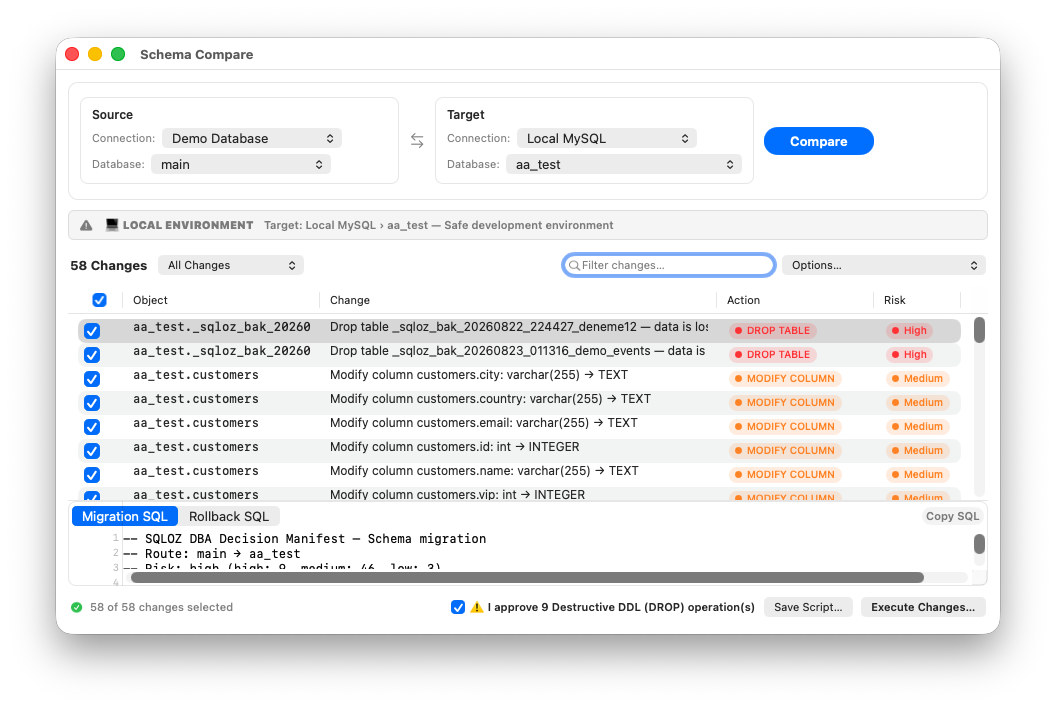
The Hidden Pitfalls of Manual MySQL to PostgreSQL Migrations
Before exploring the automated GUI solution, let’s examine why traditional manual migrations so frequently result in corrupted data or extended downtime:
1. Integer Overflow in Unsigned Types
MySQL supports UNSIGNED integers (INT UNSIGNED max value: 4,294,967,295). PostgreSQL does not have unsigned integer primitives; its signed 4-byte INTEGER caps out at 2,147,483,647. If you naively map INT UNSIGNED to PostgreSQL INTEGER, any ID or metric exceeding 2.14 billion triggers an unrecoverable integer out of range error. (SQLOZ automatically promotes these columns to 64-bit BIGINT).
2. The TINYINT(1) Boolean Trap
In MySQL, booleans are literally aliases for TINYINT(1) where 0 is false and 1 is true. In PostgreSQL, BOOLEAN is an independent primitive requiring 't' or 'f'. Without explicit casting, your application’s legacy queries will crash on data type mismatch.
3. Identity and Sequence Drift
In MySQL, AUTO_INCREMENT is a table property. In PostgreSQL, auto-incrementing identity columns depend on an external sequence object (pg_sequences). Bulk-inserting explicit primary keys into PostgreSQL does not advance the sequence counter, causing the very next application write to fail with a duplicate key violation.
For an exhaustive architectural deep dive into InnoDB vs. PostgreSQL heap storage, read our senior engineering paper on Cross-Dialect Database Migration: A Production Guide from MySQL to PostgreSQL.
How SQLOZ Solves the Migration Bottleneck on macOS
SQLOZ is a 100% native macOS database management client written in Swift and Metal. It includes an enterprise-grade Cross-Dialect Migration Engine that handles schema extraction, automated dialect conversion, high-speed binary streaming, and sequence alignment in one unified interface.
Step-by-Step Migration Walkthrough:
Step 1: Connect to Source and Target
Open SQLOZ and establish connections to both your source MySQL instance and your target PostgreSQL instance. Both connections can be secured over native SSL/TLS or SSH Tunnels.
Step 2: Open the Migration Wizard
Right-click your MySQL database in the Object Browser and select Migrate to PostgreSQL…
Step 3: Configure Dialect Transformation Rules
SQLOZ analyzes your MySQL schema and presents a pre-configured transformation blueprint:
TINYINT(1)➔BOOLEANINT UNSIGNED➔BIGINTDATETIME/TIMESTAMP➔TIMESTAMPTZ(normalized to UTC)JSON➔JSONB(binary decomposed for instant GIN indexing)AUTO_INCREMENT➔GENERATED BY DEFAULT AS IDENTITY- Zero dates (
0000-00-00 00:00:00) ➔NULL
You can inspect and fine-tune every column mapping in a clean graphical table before running the migration.
Step 4: High-Throughput Binary Streaming
Click Start Migration. Unlike legacy tools that write gigabytes of intermediate CSV files to disk, SQLOZ reads binary records from MySQL into Apple Silicon unified memory buffers and pipes them directly into PostgreSQL via native COPY ... FROM STDIN. This achieves near line-rate network throughput without disk I/O bottlenecks.
Step 5: Automatic Sequence Synchronization & Index Build
Once all rows are transferred:
- SQLOZ builds secondary B-tree indexes.
- It validates foreign key constraints in an isolated staging pass to avoid lock contention.
- It automatically synchronizes all PostgreSQL sequences to
MAX(id), guaranteeing that your application can resume inserts immediately.
Pre-Cutover Verification
Before switching your backend database connection string to PostgreSQL, verify parity:
- Row Count Parity: Verify live row counts across both engines directly in the SQLOZ sidebar.
- Inspect the Data Grid: Use SQLOZ’s responsive data grid to spot-check critical financial and user records.
- Test Application Queries: Use the SQL Editor to run complex joins and verify execution plan performance.
Summary
Migrating from MySQL to PostgreSQL shouldn’t be an anxious, multi-day ordeal. With SQLOZ, Mac developers and DBAs gain a fast, reliable, and native migration pipeline that eliminates manual scripts and protects data integrity.
Download SQLOZ for macOS and migrate your databases with confidence today.