
A common architectural trap when building a new microservice or SaaS backend is jumping straight into writing ORM models (Prisma schema, Django models.py, or Laravel migrations) before visually mapping out the relational graph.
Without a visual overview:
- You inadvertently introduce circular foreign key dependencies that block cascading deletes,
- You duplicate business attributes across multiple loosely coupled tables,
- You forget composite indexes on many-to-many junction tables, resulting in severe API query degradation when your user base scales.
In this tutorial, we outline a fast, visual-first methodology for mapping relational tables on macOS using SQLOZ before committing code to your Git repository.
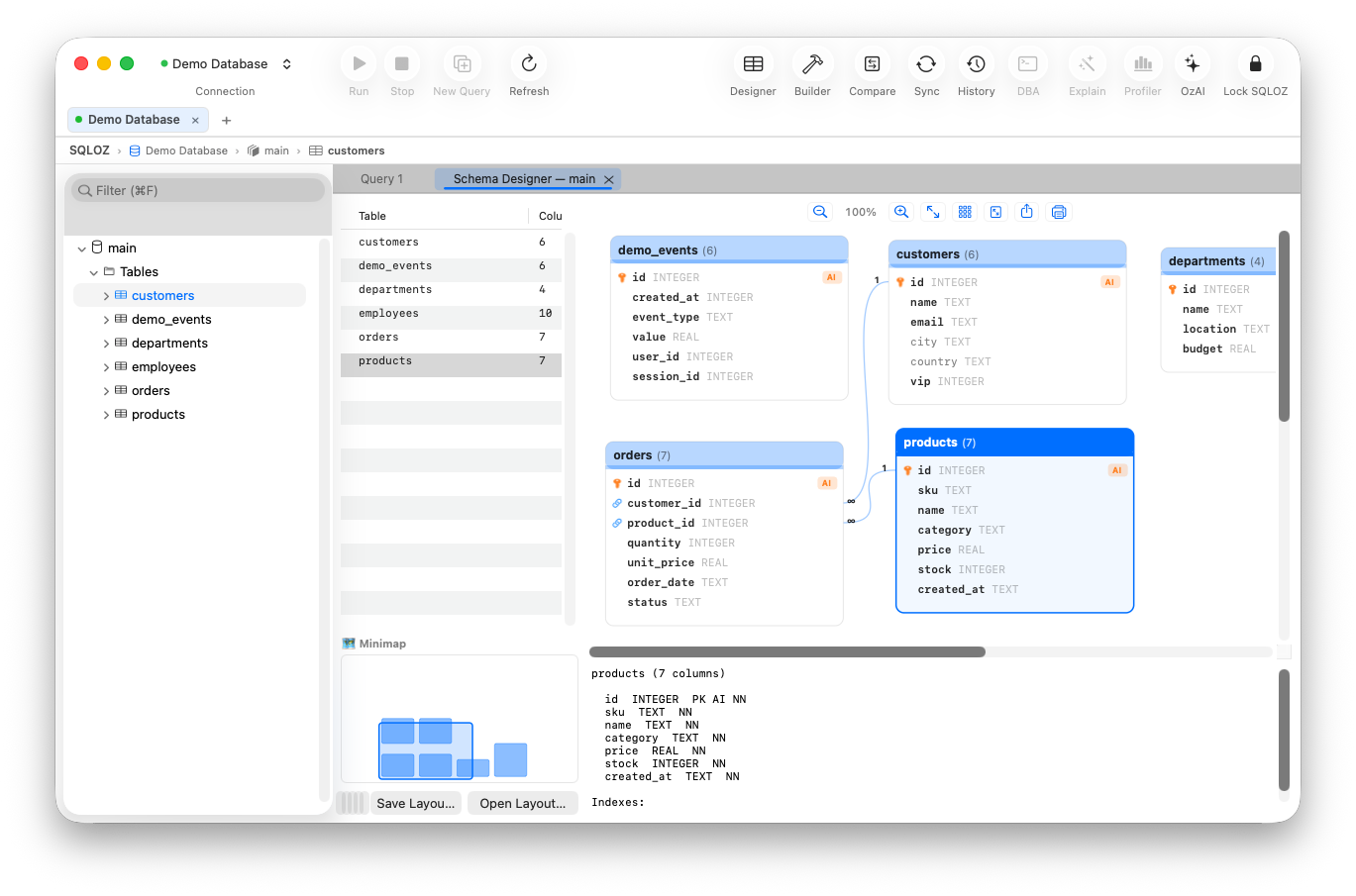
1. The Visual-First Architecture Workflow
Senior database architects follow a disciplined 4-stage pipeline:
┌─────────────────┐       ┌─────────────────┐       ┌─────────────────┐       ┌─────────────────┐
│ 1. VISUAL ERD   │ ────► │ 2. DDL GENERATE │ ────► │ 3. SEED & TEST  │ ────► │ 4. WRITE ORM /  │
│ Model in SQLOZ  │       │ Export to SQL   │       │ Query with VQB  │       │ API Code        │
└─────────────────┘       └─────────────────┘       └─────────────────┘       └─────────────────┘
By completing steps 1 and 2 visually in under 20 minutes, you validate your data domain with your frontend and product teams before writing a single line of backend controller code.
2. Step-by-Step Visual Schema Modeling in SQLOZ
Step 1: Create a Local Test Sandbox
Launch SQLOZ and initialize a clean local SQLite or development PostgreSQL database.
Step 2: Add Entities onto the Schema Canvas
Open the Schema Designer tab and click + New Table:
- Add
tenants(Multi-tenant SaaS identifier). - Add
users(Authentication credentials and profile flags). - Add
workspacesandroles.
Step 3: Connect Foreign Keys with Visual Drag-and-Drop
Click the anchor next to users.tenant_id and drag a line to tenants.id. SQLOZ opens an inline inspector where you select:
- Constraint Name:
fk_users_tenant - On Delete:
CASCADE(Deleting a tenant automatically purges all child users). - Index: Check Create B-tree Index (essential for join performance).
Step 4: Validate Relationship Topologies
Pan and zoom across the 120 FPS infinite canvas. Inspect cardinalities (1:1, 1:N, N:M). Ensure that every table has an unambiguous primary key and that no circular dependency loops exist between entities.
3. Exporting to Clean DDL and Backend Migrations
Once your visual topology is validated:
- Click Export Schema DDL.
- SQLOZ outputs clean, syntactically verified ANSI SQL migration statements tailored for your target database engine (MySQL, PostgreSQL, or SQLite).
- Copy the DDL into your project or let your ORM inspect the live database to auto-generate models (
npx prisma db pull,php artisan migrate, orpython manage.py inspectdb).
Summary
Mapping out relational database schemas visually before writing backend code eliminates costly schema refactors and prevents architectural bottlenecks.
With SQLOZ, Mac developers gain an interactive, hardware-accelerated schema designer that bridges visual architecture with live database deployment.
Download SQLOZ for macOS and design your backend schemas with confidence today.