
Attempting to connect your Mac database GUI to a remote VPS or staging MySQL server often results in an abrupt rejection:
ERROR 1130 (HY000): Host 'xxx.xxx.xxx.xxx' is not allowed to connect to this MySQL serverThis error is one of the classic security traps in MySQL administration. It occurs when the MySQL server refuses connection attempts because the user account you are logging in with has not been granted privileges to connect from your remote IP address.
In this guide, we walk through how to grant remote access safely, why opening your MySQL port to the public internet is dangerous, and how SQLOZ solves this using secure SSH tunneling.
1. What Triggers MySQL Error 1130?
In MySQL, a user identity is composed of two parts: username and host:
'root'@'localhost': Can only connect from the local server via Unix socket.'root'@'127.0.0.1': Can only connect via local loopback TCP.'dbuser'@'%': The%wildcard allows connection from any IP address.
By default, MySQL restricts administrative accounts strictly to localhost. If you attempt to connect directly from your Mac’s home or office IP address, MySQL blocks the handshake with Error 1130.
2. The Traditional (and Risky) Server Fix: Granting Remote Access
On your remote MySQL server CLI:
-- 1. Check existing user host permissions:
SELECT user, host FROM mysql.user;

-- 2. Create or update a user with a wildcard host (%):
CREATE USER 'appuser'@'%' IDENTIFIED BY 'StrongPassword123!';
GRANT ALL PRIVILEGES ON my_database.* TO 'appuser'@'%';
FLUSH PRIVILEGES;
Additionally, in /etc/mysql/mysql.conf.d/mysqld.cnf:
# Change bind-address from 127.0.0.1 to allow external connections:
bind-address = 0.0.0.0
⚠️ Extreme Security Caution: Changing
bind-addressto0.0.0.0exposes port 3306 directly to the public internet. Within minutes, automated bots will begin brute-forcing your passwords.
3. The Secure Pro Solution: Use an SSH Tunnel (Zero Server Changes Needed!)
Instead of modifying MySQL user permissions to % or opening public firewall ports, the industry-standard approach is to tunnel your connection through SSH.
Because the SSH tunnel terminates inside the remote server itself, the MySQL engine sees the incoming traffic as originating from 127.0.0.1 (localhost)!
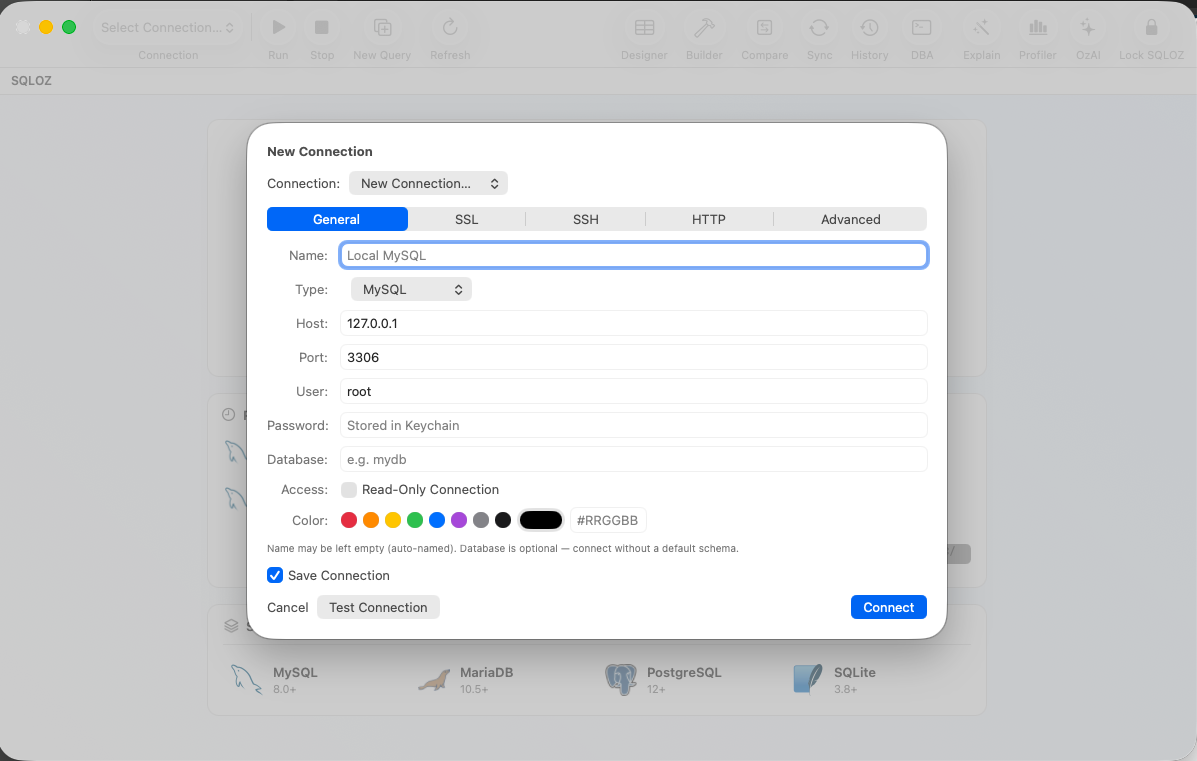
How to Connect in SQLOZ without Triggering Error 1130:
- Open SQLOZ and create a new MySQL connection.
- Under General, set Host to
127.0.0.1(the remote server’s internal localhost). - Switch to the SSH Tunnel tab and enter your server’s public IP address and SSH user (e.g.
rootorubuntu). - Select your private SSH key.
- Click Connect.
Error 1130 disappears instantly because MySQL’s default 'user'@'localhost' privileges are satisfied, and your database remains completely hidden from public port scans.
Summary
Never expose MySQL port 3306 to the public internet just to bypass Error 1130.
By utilizing SQLOZ’s native SSH tunneling, you can connect to any remote server as localhost with hardware-encrypted security.
Download SQLOZ for macOS and connect to your remote servers safely today.