
For decades, computer science textbooks and online tutorials have relied on Venn diagrams to explain SQL JOINs. Two overlapping circles: the middle is an INNER JOIN, the left circle is a LEFT JOIN, and everything combined is a FULL OUTER JOIN.
There is just one problem: Venn diagrams are set theory diagrams, not relational join diagrams. In relational algebra, a join does not merely identify common elements; it creates Cartesian pairs based on matching predicate keys (ON a.id = b.a_id). When duplicate keys or null values enter the picture, Venn diagrams fail completely to represent what the database engine is actually doing.
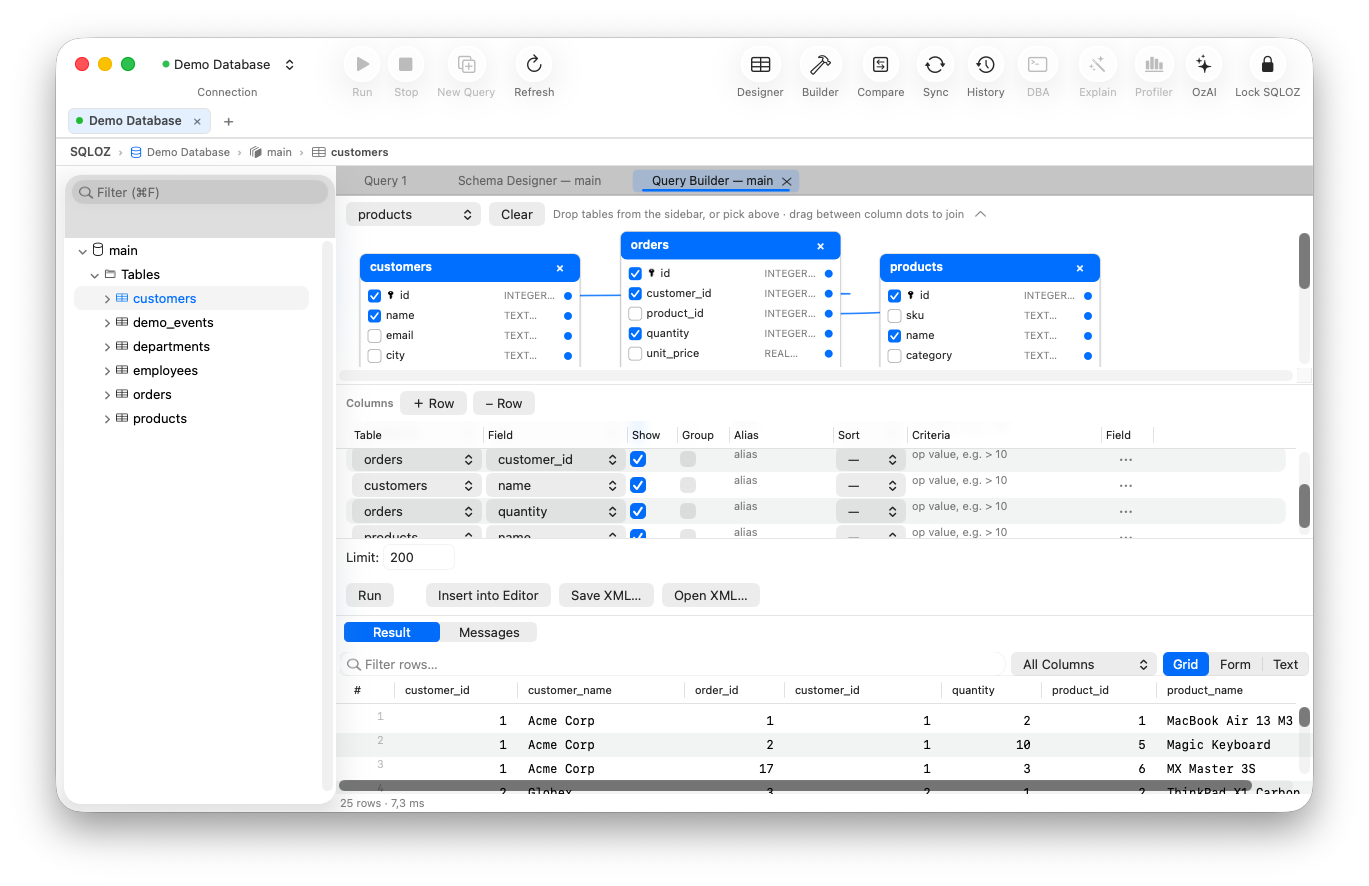
In this practical visual guide, we explain the 4 primary SQL JOIN types using real relational row models and show how modern tools like SQLOZ’s Visual Query Builder make joins drag-and-drop simple on Mac.
The Sample Data: Customers and Orders
Consider two simple tables:
[ customers ]                     [ orders ]
┌────┬─────────┐                  ┌─────┬─────────────┬────────┐
│ id │ name    │                  │ oid │ customer_id │ amount │
├────┼─────────┤                  ├─────┼─────────────┼────────┤
│ 1  │ Alice   │                  │ 101 │ 1           │ $250   │
│ 2  │ Bob     │                  │ 102 │ 1           │ $120   │
│ 3  │ Charlie │                  │ 103 │ 2           │ $80    │
│ 4  │ Diana   │                  │ 104 │ 99 (Orphan) │ $45    │
└────┴─────────┘                  └─────┴─────────────┴────────┘
(Notice: Diana has 0 orders. Order 104 belongs to non-existent customer 99).
1. INNER JOIN: The Strict Intersection
An INNER JOIN only returns rows where the join predicate finds a matching record in both tables.
SELECT c.name, o.oid, o.amount
FROM customers c
INNER JOIN orders o ON c.id = o.customer_id;
The Result Set:
┌─────────┬─────┬────────┐
│ name    │ oid │ amount │
├─────────┼─────┼────────┤
│ Alice   │ 101 │ $250   │
│ Alice   │ 102 │ $120   │
│ Bob     │ 103 │ $80    │
└─────────┴─────┴────────┘- Who was excluded? Diana (no orders) and Order 104 (no matching customer) are completely dropped.
2. LEFT OUTER JOIN: Keep the Master Entity
A LEFT JOIN guarantees that every single row from the left table (customers) appears in the output, regardless of whether a matching order exists. If no match is found on the right, all right-hand columns are filled with NULL.
SELECT c.name, o.oid, o.amount
FROM customers c
LEFT JOIN orders o ON c.id = o.customer_id;
The Result Set:
┌─────────┬──────┬────────┐
│ name    │ oid  │ amount │
├─────────┼──────┼────────┤
│ Alice   │ 101  │ $250   │
│ Alice   │ 102  │ $120   │
│ Bob     │ 103  │ $80    │
│ Charlie │ NULL │ NULL   │
│ Diana   │ NULL │ NULL   │
└─────────┴──────┴────────┘- Why this is critical: This is how you find inactive customers or users who have never made a purchase (
WHERE o.oid IS NULL).
3. RIGHT OUTER JOIN: Keep the Secondary Records
A RIGHT JOIN is the exact inverse of a LEFT JOIN: every row from the right table (orders) is preserved.
SELECT c.name, o.oid, o.amount
FROM customers c
RIGHT JOIN orders o ON c.id = o.customer_id;
The Result Set:
┌────────┬─────┬────────┐
│ name   │ oid │ amount │
├────────┼─────┼────────┤
│ Alice  │ 101 │ $250   │
│ Alice  │ 102 │ $120   │
│ Bob    │ 103 │ $80    │
│ NULL   │ 104 │ $45    │  <-- Orphaned Order!
└────────┴─────┴────────┘- Why this matters: This lets you detect corrupted data or orphaned foreign keys where parent records were deleted.
4. FULL OUTER JOIN: The Comprehensive Union
A FULL OUTER JOIN combines the results of both LEFT and RIGHT joins. Every customer and every order appears; unmatched sides are populated with NULL.
(Note: MySQL does not support FULL OUTER JOIN natively and requires a UNION of LEFT and RIGHT joins. PostgreSQL and SQLite support it directly).
5. Building JOINs Visually in SQLOZ (Zero Syntax Errors)
Instead of typing repetitive ON c.id = o.customer_id clauses and risking accidental Cartesian products (CROSS JOIN):
- Open SQLOZ and switch to the Visual Query Builder tab.
- Drag
customersandordersonto the 120 FPS canvas. - Click the anchor dot on
customers.idand drag a connector line toorders.customer_id. - Click on the connector link badge to toggle between INNER, LEFT, or RIGHT join modes.
- Watch the Live SQL Preview panel generate formatted, SARGable SQL in real time!
Summary
Understanding SQL joins is essential for relational data querying. When you can visualize table relationships on an interactive canvas, spotting missing matches and designing multi-table reports becomes effortless.
Download SQLOZ for macOS and experience visual SQL join modeling today.