
In modern web development, speed is everything. Building features locally against an embedded SQLite file lets you iterate rapidly, run instant unit tests, and test schema changes without waiting for remote server round-trips.
However, once a feature branch is ready for QA, you need to push your local mock data, seeded catalogs, and schema updates to a remote staging MySQL server so your frontend team and QA testers can validate it in a realistic cloud environment.
Manually dumping SQLite, tweaking SQL dialects with regex, and running mysql < dump.sql over the terminal is tedious and error-prone.
In this guide, we show you how to synchronize your local SQLite development database directly into a remote MySQL staging server in seconds using SQLOZ on macOS.
The Typical Staging Sync Friction
When developers attempt to sync local SQLite to staging MySQL:
- Network Barriers: Staging MySQL servers are usually firewalled inside a cloud VPC (AWS, DigitalOcean, or GCP) and require SSH Tunneling.
- Schema Drift: Local SQLite migrations may contain experimental tables or modified columns that conflict with existing staging schemas.
- Dialect Mismatches: Differences between SQLite’s
INTEGER PRIMARY KEY AUTOINCREMENTand MySQL’sBIGINT AUTO_INCREMENTrequire manual translation.
The Rapid 3-Step Sync Workflow in SQLOZ
SQLOZ is a native macOS database client designed to make dev-to-staging synchronization effortless.
Step 1: Open Your Local Project SQLite File
Open SQLOZ and add your local SQLite database file (e.g., database/database.sqlite in Laravel or db.sqlite3 in Django).
Step 2: Connect to Staging MySQL via Encrypted SSH Tunnel
In the same SQLOZ window, open your Staging MySQL connection profile. SQLOZ automatically connects through your jump bastion using native macOS Keychain private key authentication.
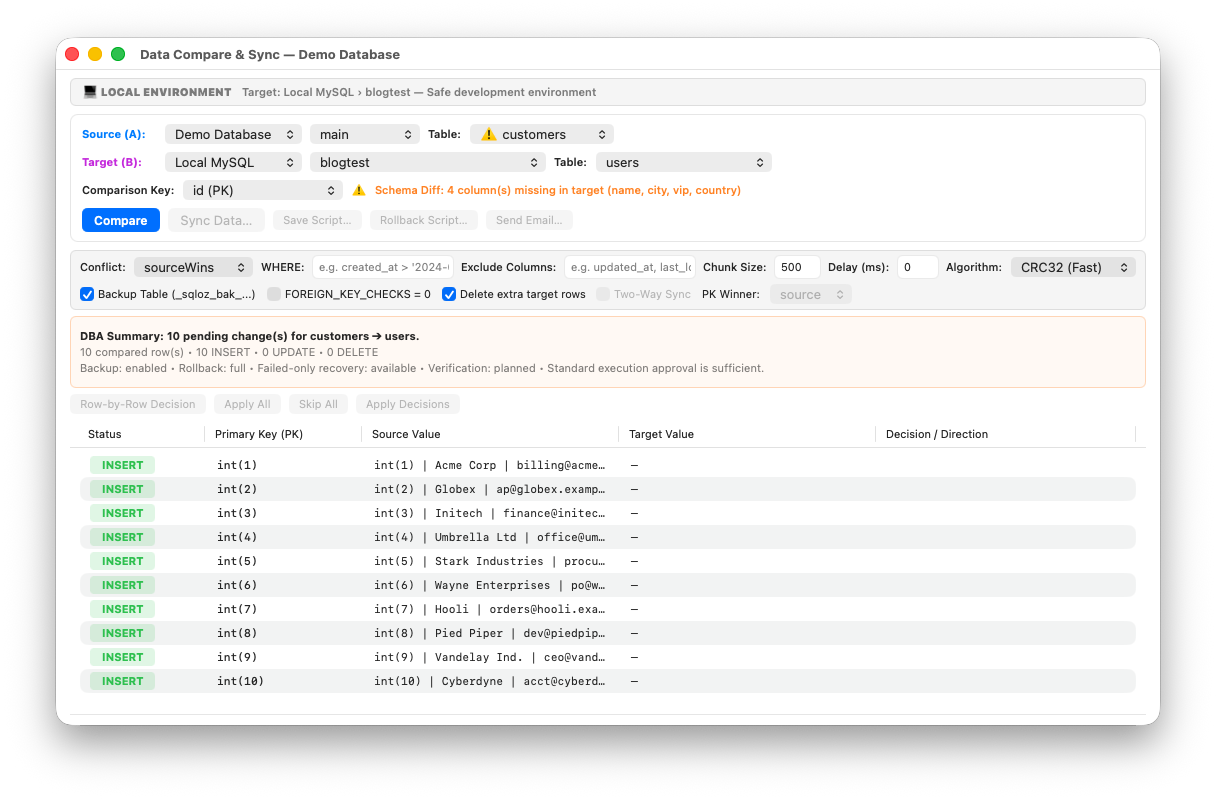
Step 3: Run the Attended Data Sync Wizard
- Right-click your SQLite connection and select Sync to MySQL Staging…
- SQLOZ compares table structures, maps data types, and highlights diffs.
- Choose whether to Replace Target Tables or Upsert Missing Rows.
- Click Execute Sync. SQLOZ pipes the data directly through memory into staging MySQL in seconds.
Safe Staging Practices: Using Environment Color Badges
To avoid accidentally syncing dev mock data into production instead of staging, SQLOZ lets you tag your staging server with an Orange Staging Badge and your production database with a Red Production Badge.
Visual cues on tab headers ensure you always verify target environments before executing writes.
Summary
Don’t let database deployment friction slow down your shipping cadence. With SQLOZ, pushing your local SQLite development database to cloud staging MySQL takes just a few clicks.
Download SQLOZ for macOS and streamline your staging deployments today.