
For nearly a decade, Sequel Pro (with its iconic yellow pancake icon) was the undisputed king of macOS database clients. Almost every PHP, Ruby, Python, and Node.js developer working on a Mac kept it pinned to their Dock. It was blindingly fast, lightweight, and genuinely native.
However, software moves forward, and unmaintained tools eventually break.
Following the release of macOS Catalina and MySQL 8.0, Sequel Pro began suffering from catastrophic crashes:
- Fatal crashes on connecting to MySQL 8.0 due to unsupported
caching_sha2_passwordauthentication. - Immediate segmentation faults when opening table schemas or running full-text searches.
- Complete abandonment by its original maintainers, with the last stable release dating back to 2016.
If you are one of the thousands of Mac developers still searching for that elusive, snappy, modern Sequel Pro successor, you aren’t alone. In this guide, we evaluate the top 5 modern replacements for Sequel Pro on macOS in 2026.
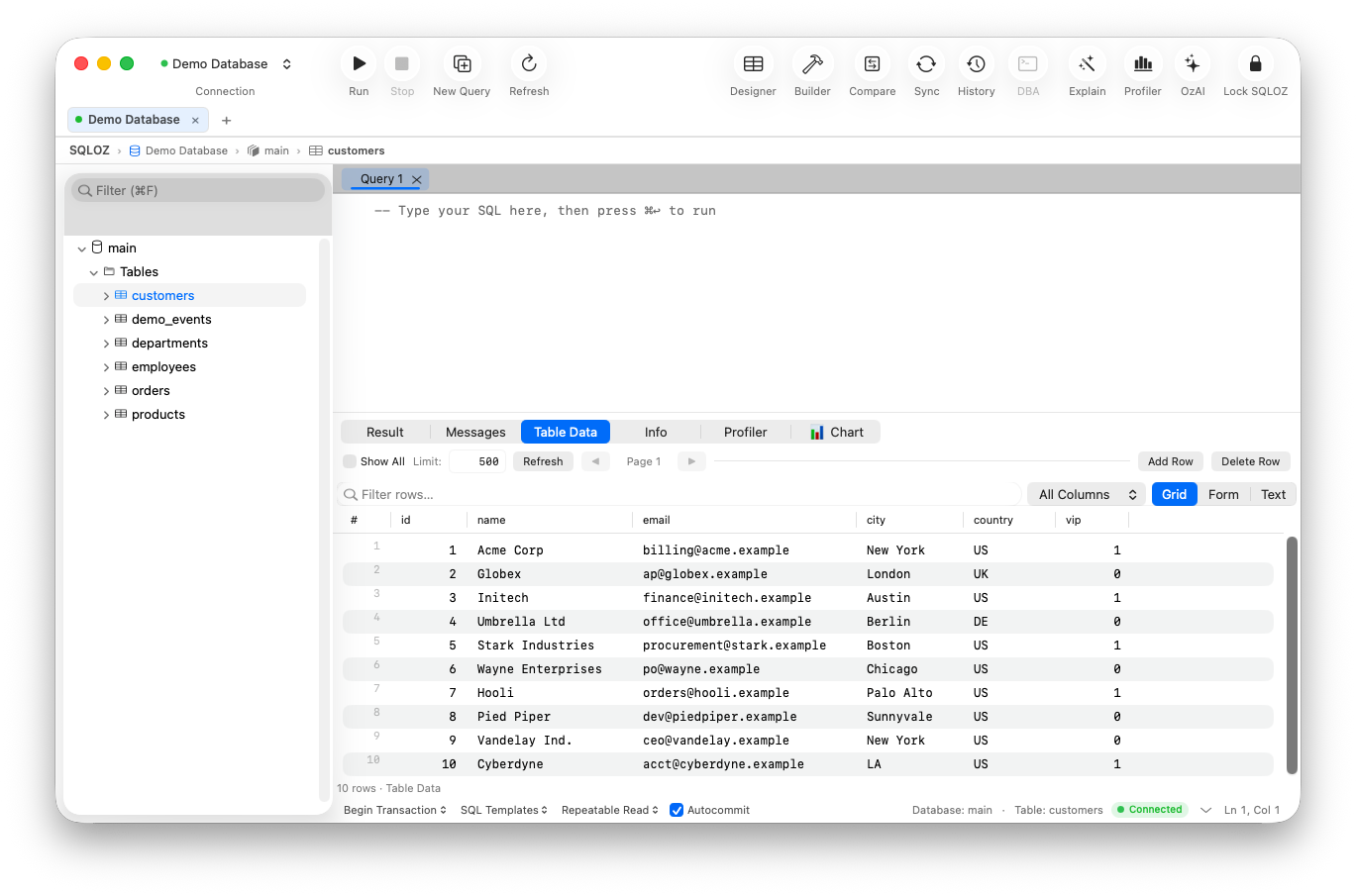
1. SQLOZ: The True Spiritual Successor to Sequel Pro
If what you loved about Sequel Pro was its pure native macOS soul, instant speed, and zero bloat, SQLOZ is the modern replacement you’ve been waiting for.
Why SQLOZ is the #1 Sequel Pro Alternative:
- Modern Native Core: Written in modern Swift and Metal, specifically tuned for Apple Silicon (M1, M2, M3, M4).
- Multi-Engine Support: While Sequel Pro was strictly locked to MySQL, SQLOZ seamlessly connects to MySQL, PostgreSQL, SQLite, and MariaDB from a single unified window.
- Full MySQL 8.4+ and TLS 1.3 Compatibility: Native support for modern authentication plugins, ECDSA keys, and encrypted SSH bastion tunnels.
- Visual Query Builder: Features a drag-and-drop relationship visualizer that makes writing complex multi-table JOINs faster than ever before.
- Safety First: Hardware-backed Keychain credential storage and production execution guards that protect you from accidental
DELETEdisasters.
Verdict: SQLOZ captures the lightning-fast, featherlight spirit of classic Sequel Pro while bringing modern 2026 database architecture, AI assistance, and PostgreSQL versatility to your Mac.
2. Sequel Ace: The Community Direct Fork
When Sequel Pro stalled, open-source contributors formed Sequel Ace to patch the crashes and keep the original codebase alive.
- Pros: Free, open source, and preserves the exact UI layout and muscle memory of Sequel Pro.
- Cons: Still fundamentally tied to MySQL only; struggles occasionally with newer macOS window management APIs and memory leaks under heavy query workloads.
- Verdict: The best direct 1:1 clone if you only use MySQL and refuse to learn a new keyboard shortcut.
3. TablePlus: The Commercial Minimalist
TablePlus stepped into the void left by Sequel Pro’s demise and built a dedicated following among modern web developers.
- Pros: Crisp native Swift interface; inline data editing; supports a wide range of databases (PostgreSQL, MySQL, Redis).
- Cons: Strict free-tier restrictions (limits you to 2 open workspace tabs and 2 active filters); no visual relationship builder.
- Verdict: A polished, everyday utility for developers willing to pay for a commercial license.
4. Beekeeper Studio: The Open-Source Multiplatform Pick
Beekeeper Studio offers a clean, developer-friendly interface for teams working across mixed OS environments.
- Pros: Polished design; consistent keyboard shortcuts across macOS, Linux, and Windows.
- Cons: Built on Electron. Idle RAM consumption easily exceeds 600MB, lacking the instantaneous responsiveness of native Cocoa apps.
- Verdict: Good for multi-OS development teams, but heavy for Mac purists.
5. DBeaver: The Enterprise Powerhouse
For developers migrating from small local databases to massive enterprise data warehouses:
- Pros: Connects to literally any database engine; comprehensive ER diagrams and export wizards.
- Cons: Built on Java/Eclipse. Extremely heavy UI, slow launch times, and non-native feel on macOS.
- Verdict: Overkill if you just want a quick, clean Sequel Pro replacement.
Feature Comparison: Modern Replacements vs. Classic Sequel Pro
| Capability | Sequel Pro (Legacy) | Sequel Ace | TablePlus | SQLOZ (2026) |
|---|---|---|---|---|
| Active Maintenance | ❌ Abandoned | ✅ Community Active | ✅ Commercial Active | ✅ Actively Developed |
| Architecture | 32/64-bit Objective-C | Objective-C / Swift | Native Swift | Pure Swift & Metal (Apple Silicon) |
| PostgreSQL Support | ❌ None | ❌ None | ✅ Yes | ✅ Native Support |
| MySQL 8.4+ Auth Plugins | ❌ Crashes | ✅ Supported | ✅ Supported | ✅ Native Cryptographic Support |
| Visual Query Builder | ❌ None | ❌ None | ❌ None | ✅ 120 FPS Infinite Canvas |
| Idle Memory Footprint | ~80 MB | ~110 MB | ~90 MB | 45 MB – 75 MB |
Time to Retire the Pancake Icon
Holding onto Sequel Pro with nightly crash workarounds is a ticking clock for your engineering workflow. Today’s web and cloud databases require robust TLS 1.3 encryption, modern authentication plugins, and multi-engine flexibility.
Upgrade to a modern, lightning-fast native database client that honors your Mac hardware.
Looking for the modern sequel to Sequel Pro?
Download SQLOZ for macOS and experience instant database management today.