
Connecting to a newly installed MySQL 8.0 or MySQL 8.4 instance on macOS often stops cold with an obscure error message:
java.sql.SQLNonTransientConnectionException: Public Key Retrieval is not allowed
-- or:
Authentication plugin 'caching_sha2_password' reported error: Authentication requires secure connection.
This error is one of the most frequently searched MySQL issues in the world. It traps developers using tools like DBeaver, legacy Sequel Pro, and Node/Java database drivers.
In this troubleshooting guide, we explain the root cryptographic cause of this error and show you how to fix it permanently - both at the server level and seamlessly through SQLOZ on Mac.
1. What Causes “Public Key Retrieval is Not Allowed”?
Starting in MySQL 8.0, the default password authentication plugin changed from legacy mysql_native_password to caching_sha2_password.
Under the SHA-256 protocol:
- When connecting without TLS/SSL encryption, the MySQL client must request the server’s public RSA key to encrypt the user’s password before sending it across the network.
- If the client does not explicitly have permission to request that public key, MySQL deliberately blocks the connection to protect against Man-in-the-Middle (MITM) attacks.
2. Server-Side and Driver Fixes
Fix A: Enable SSL / TLS (The Recommended Production Fix)
If you configure an encrypted TLS connection, MySQL transmits credentials securely through the TLS tunnel without needing an independent RSA public key handshake.
Fix B: Add Driver Flag (allowPublicKeyRetrieval=true)
In JDBC and connection string URLs, you can pass:
jdbc:mysql://localhost:3306/db?allowPublicKeyRetrieval=true&useSSL=falseFix C: Switch User to Legacy Password Plugin (Local Dev Only)
In MySQL CLI:
ALTER USER 'root'@'localhost' IDENTIFIED WITH mysql_native_password BY 'your_password';
FLUSH PRIVILEGES;
(Note: mysql_native_password is deprecated in MySQL 8.4 and removed in future releases. Relying on it long-term is discouraged).
3. The Permanent GUI Fix in SQLOZ
While older tools crash or require editing obscure XML config files, SQLOZ natively handles the caching_sha2_password cryptographic handshake out of the box.
How to Connect in SQLOZ:
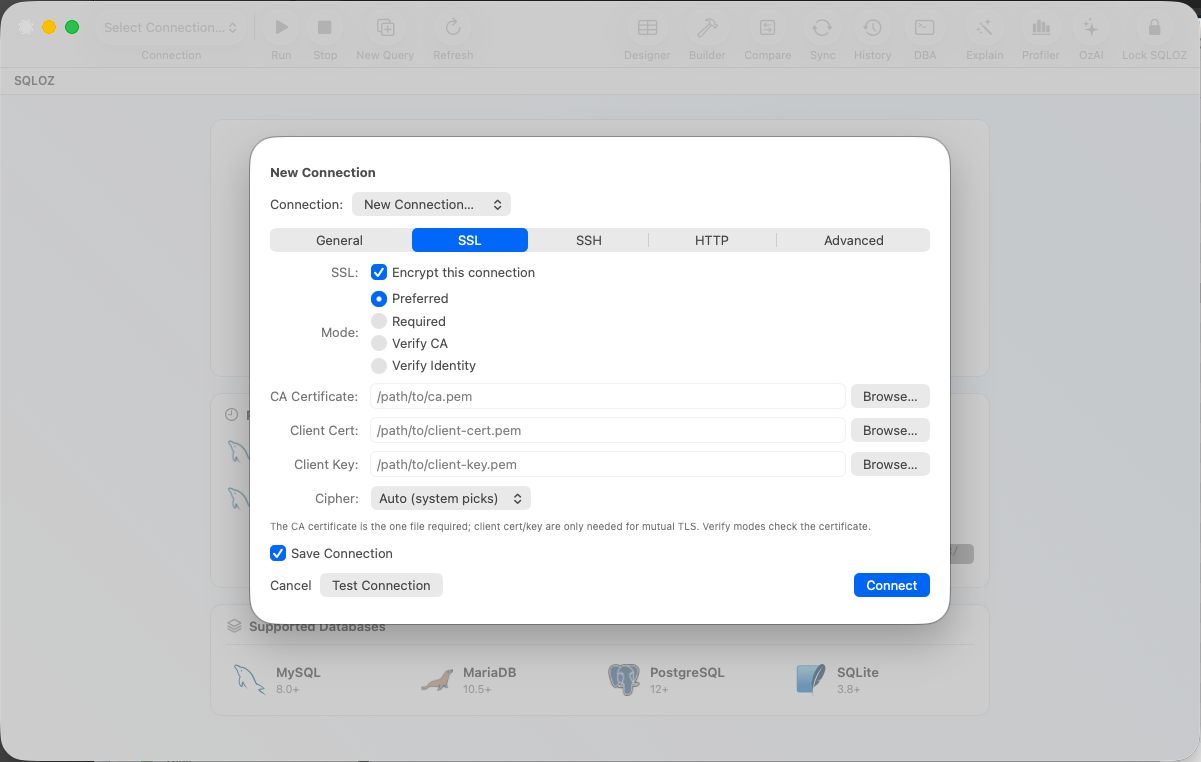
- Open SQLOZ and click New Connection ➔ MySQL.
- Under the SSL tab, choose SSL Mode: Preferred (or Require for cloud hosts).
- If connecting to a local unencrypted test instance, toggle Allow Public Key Retrieval ON with a single checkbox.
- SQLOZ automatically exchanges the ephemeral RSA public key in memory and establishes the connection in milliseconds.
No terminal tweaking, no server reboots, and no insecure plugin downgrades.
Summary
The “Public Key Retrieval is not allowed” error is a security safeguard designed to protect your passwords from plaintext interception.
With SQLOZ, Mac developers get automated cryptographic negotiation and native macOS Keychain integration, eliminating connection headaches forever.
Download SQLOZ for macOS and connect to MySQL 8.4+ effortlessly.